
How-to Install Google Earth 5 on Ubuntu
UPDATE: See How to Install Google Earth in Ubuntu 10.04 for up-to-date instructions!
Google Earth puts the world’s geographic information at your fingertips. There’s a native Linux port of the latest version, Google Earth 5.
Here’s how you can easily install Google Earth on Ubuntu.
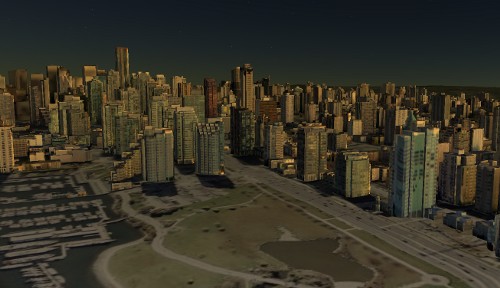
Install Google Earth
- Download and save the Google Earth installer for Linux.
- The file you downloaded should be called
GoogleEarthLinux.bin. Find this file, right mouse click on it and selectOpen with Other Application. - Click to expand the
Use a custom commandsection of theOpen Withdialog. Typesh, and clickOpen.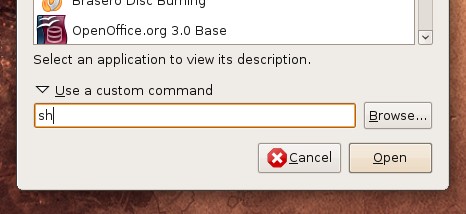
- The Google Earth installer will decompress itself, and in a few seconds the
Google Earth Setupwindow should open. The default options should be fine, so clickBegin Installto continue.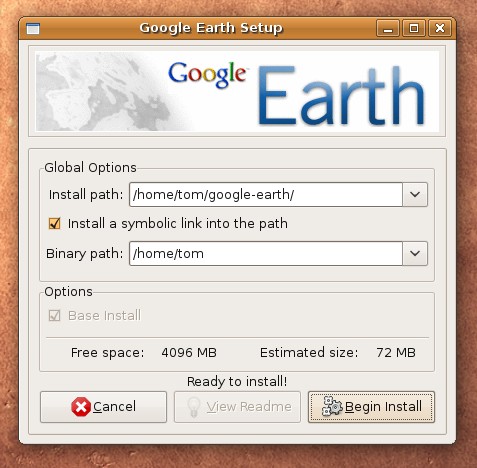
- Once the installation is finished, click
Quitto close the installer, and press return to close the terminal that the installer opened. Start Google Earth from theApplications->Internet->Google Earthmenu.
Troubleshooting
If Google Earth opens, shows the splash screen, and then crashes, you’re
probably experiencing a common issue. Running ~/google-earth/googleearth in a
terminal will show this
error:
./googleearth-bin: relocation error: /usr/lib/i686/cmov/libssl.so.0.9.8: symbol BIO_test_flags, version OPENSSL_0.9.8 not defined in file libcrypto.so.0.9.8 with link time reference
To fix this, browse to the folder you installed Google Earth into. By default
this will be google-earth in your home folder. Find the file
libcrypto.so.0.9.8 and rename it to something else, like
libcrypto.so.0.9.8.bak. Google Earth should now start correctly. [related
bug report]
Archived Comments
Arcterex
*sigh* Nope, still crashes with a big ugly stack dump on AMD64 Ubuntu 8.10 :(
Daniel Holbach
Or:
$ sudo apt-get install googleearth-package
$ make-googleearth-package –force
Doubleclick on the resulting .deb file.
onestep
Great how-to, easy to follow.
I had to uninstall because Google Earth used up all my CPU’s & Memory.
To uninstall run the uninstall shell script located in the google-earth folder
Yuval
Thank you, worked perfectly
Andy Leeman
Worked great. Now I just need a fix for the missing letters bug on Intel
graphics and all will be well.
http://ubuntuforums.org/showthread.php?t=1087793
quixote
I have 8.10, amd-64, like Arcteryx. same exxperience for me. Renaming the lib stops it from crashing, by it doesn’t really load. I have 3GB RAM so memory shouldn’t be the issue. (It used to be on another machine, whien I first tried GoogleEarth, and that one failed in a very similar-looking way.)
quixote
Following Daniel Holbach’s comment: GE does come up and sort of work, but there are still a lot of issues. Blank or miscolored sectors on the globe, squares to the right (menus of some sort?) which are just multicolored pixels, only a few numbers appearing in the lat - long at the bottom.
ubuntubrian
I installed GE 5 on AMD64 Toshiba laptop. It works as well or better than GE 4 but there are some font issues. As far as the “Blank or miscolored sectors on the globe, squares to the right (menus of some sort?) which are just multicolored pixels, only a few numbers appearing in the lat - long at the bottom.“, I found that having any compiz effects at all produced those problems. turning off all desktop effects lets GE run perfectly (except the missing letters).
Paúl
Thank you for the tip about the library, I installed and work fine for a day but suddenly started to crash. I was going to downgrade to Google Earth 4 when I read this. Nice!
Jim
Thanks for the excellent write-up! Previously used Fedora but things spilled over in the end and so I recently changed to Ubuntu. I have since found your blog and am enjoying it to great extent. Keep up the good work dude! *hail*
Jantho
Hi!
Thanks for the tutorial, everything worked perfectly. But I’m new to Ubuntu so I have no idea how to change the name of this libcrypto.so.0.9.8 file, Ubuntu tells me I have no permission to do that. What can I do?
Thanks,
Jantho
Jantho
it worked, did a little mistake. thanks again!
dondrup
i navigate to the libcrypto.so.0.9.8 file but am unable to rename it due to not being the owner. so how do i change permissions on this? sorry i am totally new…
Tom
You can start the file browser as root to rename the file if you’re not the
owner. Open the Run Application dialog with Alt-F2 and run:
gksu nautilus
Benjamin
Hi there. Install is working but running the program is not working (graphics are very messed up and eventually the computer crashes). But never mind, i don’t need GE that badly. Now what i’d like to know is how to un-install it. Could you give me some hints? I know only how to go through add/remove but that won’t work for GE. Thanks. B.
Tom
Running the installer again should give you the option to uninstall.
Tim
Worked like a charm! Thanks, buddy!
Tim
Russsell
Thanks worked great after I edited file name(be sure
and put a period on end of name)
mooh
thank you
Nick
After renaming libcrypto.so.0.9.8 googleearth sort of ran, just said “Warning: Unable to create prefs directory ‘/home/nick/.googleearth’. File exists.“, but it didn’t seem to be able to work out which window to make live or which to foreground nor did it ever finish redrawing any of them, really, just sat there and jittered. Totally unusable.
Is there any known cure for this or do I just dump this bugridden garbage?
ubuntubrian
See from above:
I installed GE 5 on AMD64 Toshiba laptop. It works as well or better than GE 4
but there are some font issues. As far as the “Blank or miscolored sectors on
the globe, squares to the right (menus of some sort?) which are just
multicolored pixels, only a few numbers appearing in the lat - long at the
bottom.”, I found that enabling any desktop effects at all produced those
problems. Turning off all desktop effects lets GE run perfectly (except the
missing letters).
I got the existing prefs directory message too. I just renamed the existing one “.googleearth.old” and when I ran GE5 it generated the needed directory.
Mark J Daniels
I’ve managed to install Earth on Ubuntu and renamed the libcrypto file, which fixed the problem of crashing.
Now the application will start, but it is running extremely shoddily - loading is very slow and the globe keeps disappearing to be replaced with outlines.
Any known reason for this?
John Palmer
Your instructions on how to install Google Earth were good
and worked for me. However, I did need to install a
multicast dns resolution program:
sudo apt-get install lib32nss-mdns
to get past a startup error when I did the installation on
Ubuntu 9.04 (AMD64). Thanks for posting the instructions.
Jokke/Finland
Thank You; I finally DID get GoogleEarth 5.0 on my Ubuntu 9.04-system
cecil999
Googleearth just crashes. At the command line it crashes so i don’t even get an error message.
would been a nice additon. unfortunately it does not work on ubunto 8.4
Cecil
Rengifo
Thanks for short explanation about how to install Google earth 5.0 on Ubuntu 9.04
rabtokotany mamimahefa
I succesfully installed GE 5 on HP 6730 s laptop
“images overlay” doesn’t work well : images are vague
HELP
John
After typing “sh” and clicking open, the window simply says to hit “return” and nothing happens???
help?
kgas
Installation and working is ok. One thing is to change working directories in the conf file.The other thing is that the uninstaller provided did not work.
Ruben
Great. This did not work. I went to help.ubunto.com and found a different guide there which installed a working google earth–now I have two installs of google earth. How do i remove the non working one?
Pranav A
Thanks for sharing this… turned out damn simple :D
but I noticed it’s running pretty slow in Ubuntu 9.04. :(
Unusual I guess…
Thanks anyways.
rabtokotany mamimahefa
“images overlay” on my GE 5.0 doesn’t work well
help
livingdaylight
yay! I liked the, right-click, open with ‘sh’ route…
However, instead of finding it in my Applications>Internet menu i have a
googleearth launcher in /home/livindaylight
It launches and works, but would prefer to have it sitting properly in my
Applications menu.
Any idea or suggestion to fix this?
Thank You
Rodney Gray
In my case Google Earth starts loading (about half the Globe is displayed) but the system crashes after about 11 seconds. Although the computer does not re-boot, it goes back to the login screen, i.e. a logout is forced. Deletion of the file “libcrypto.so.0.9.8? has no effect; the crashes simply continue.
I am very new to Ubuntu and should like to get Google Earth running. Any assistance would be greatly appreciated.
Rodney Gray
Sorry - I neglected to provide information about my (fairly low-end) system.
Here it is:
MS-6533E motherboard, 1.7GHz Celeron processor, 1GB RAM, Dual-boot with Windows
XP on a 250 GB HDD and Ubuntu 8.04 LTS on a 30 GB HDD.
Anonymous
thnx, its working
ekd
HERE is the video tutorial for installing Google Earth 5 in Ubuntu
Solrac924
Thanks a lot Tom. your steps worked fine for me.
i’m using Ubuntu 4.08 (Hardy) 64-bit with Linux 2.6.24-24
have been wanting GE v5.0 for weeks & this was the only site that showed me how.
=D
Everett
Thank you, but Google earth is very slow (LAG) and I mean very slow..
Any way to speed it up?
Ubuntu User in Athens
Very well written instructions, but the application run so slow that I had to uninstall it.
Hugh
To fix the slowness issue you need to untick the Atmosphere option under the View menu. I guess it is a bug….
Dennis
To speed it up go to view and uncheck atmosphere.
Mojo Texas
My installation went easy, and google earth runs, but the screen is flashing.
It’s usable, but not perfect.
Sometimes the image goes blank, or flashes white on and off.
Any ideas?
Ubuntu 9.04, 4gigs ram, dual core 64 bit @2.5GhZ
ayberk
thank you :)
Jorge
When I install the package on Karmic Koala beta amd64 I get the following error, any advice will be welcome
Verifying archive integrity… All good.
Uncompressing Google Earth for GNU/Linux
5.1.3509.4636………………………………………………………
./setup.sh: 284: setup.data/bin/Linux/amd64/setup.gtk2: not found
./setup.sh: 299: setup.data/bin/Linux/amd64/setup.gtk: not found
The setup program seems to have failed on amd64
Fatal error, installer failed to run at all!
Nigel
I am installing it now, but it is taking forever (more than an hour has elapsed). I am using 9.10 on an older PC (800mhz).
Giovanni
Thx
mikobuntu
i have found a workaround for the glitchy graphics from various sites…
1. goto “view” and untick atmosphere and water surface
2. disable any desktop effects compiz etc
3. goto >tools>options>3d view>texture color (change to 16 bit)
4. >tools>view>options>3d view> graphics mode > (tick “on” safe mode)
RESTART GE5 ,and hopefully your good to go..
luis
Thank you, perfect!!
Philip
I preferred to use the custom command
“gksudo sh”
rather than just “sh”. That way it installed as a proper application and is
picked up in the menus.
Stavvy
Installed on Dell Inspiron 1300 with 9.10. Quick and easy installation. Worked first time. Many thanks.
harold
It seems different Linux versions operate differently. The sh command worked for me, but I’m running Ubuntu 9.10 and believe it or not it’s a 64 bit version. They do have one.
I had to switch graphics drivers in System > Administration > Hardware Drivers, I believe. The recommended driver didn’t works so I had to use an earlier one. Odd thing, then the later one worked too. I guess it’s the old updating thing, as I updated from the third one listed and skipped the second.
Software Sources can get you more drivers, if you click the restricted options. In short, I do believe you can do most things from the Desktop or GUI without getting into too many elaborate commands in Terminal and even without using proprietory restricted files, though I’m sure that sometimes you have too. Ubuntu usually figures that for you too and puts them in Hardware Drivers. Also, the computer you have doesn’t usually matter, except for 16, 32, or 64 bit. Mostly it’s your operating system that someone needs to know in helping you, and your history, like what you’ve tried or if you are updating of a new install etc.
You can even increase the size of the Google fonts for File and Edit etc. in QT 4 settings in Administration. If you don’t have it, it’s good to have it, in my Ubuntu version, anyway. Maybe QT 3 has a similar visual interface. I think even apt-get and other commands have their visual interface. That’s neat.
Oh, well it’s best to start reading help from the beginning rather than jumping to step five, before 2, 3 and four, sometimes. That’s empowering also. Not bad for a three week user.
Slobodan.Dimic
excellent! worked like a charm! thanks!
Simon
This really helped me but after the installation, when I to launch Google Earth
I get the splash screen and then it goes away. I have tried launching in
terminal and get the following error:
”
simon@simon-laptop:~$ ~/google-earth/googleearth
googleearth-bin: ../../src/xcb_io.c:542: _XRead: Assertion
`dpy->xcb->reply_data != ((void *)0)’ failed.
Google Earth has caught signal 6.
We apologize for the inconvenience, but Google Earth has crashed.
This is a bug in the program, and should never happen under normal
circumstances. A bug report and debugging data have been written
to this text file:
/home/simon/.googleearth/crashlogs/crashlog-4b40f06d.txt
Please include this file if you submit a bug report will to Google.
”
The installation worked fine but I have no clue what to do now :P
Thank you in advance!
Peter
Thanx!! this worked just great after screwing around with it for the past 2 hours. :)
Antonio
Tank you for this post! Very usefull. I’ve already solved all problems with
Earth.
Tank you so mutch!
redball
Thanks for your help…works perfectly. Great instuctions
Mark
Installed painlessly and didn’t encounter the bug you mentioned. Thanks.
Silver
perfect! ubuntu 9.10 gnome 64-bit
Brian
IF ONLY OTHER APPS WERE AS EASY AS THIS ONE TO INSTALL. FAB
kirvon
thank you very much PERFECT
HR
its fine to tell how to install google earth but were can one download it for
linux. there seems to be no link anywere?????
HR
thiyagi
Worked perfectly, except the fonts looks crapy…
Tim
Thanks so much, so simple so precise
glavkos
Great …fast and simple…
Andy
excellent job! thanks.
jopa
thank works,gracias funciona.
z2ara
you made me happy today
Jones
Thanx, my mom was always tellin’ me to “sh” and be quite.
Henry
Thanks there is great advice from this site.
I just downloaded Google Eath 5.2 for linux and the advice above did not work,
and there was no libcrypto file. I took GE off and selected custom installation,
choosing version 5.1.
It seems to work fine after I followed the steps above.
igarny
Great tips on installing Google Earth on Ubuntu. Works for me on Ubuntu 10.4
mikeljoe
I have install the google earth and it crashes also, but the the problem notice is this:
(process:2074): GLib-GObject-CRITICAL **: /build/buildd/glib2.0-2.22.3/gobject/gtype.c:2458: initialization assertion failed, use IA__g_type_init() prior to this function
(process:2074): GLib-CRITICAL **: g_once_init_leave: assertion `initialization_value != 0’ failed
(process:2074): GLib-GObject-CRITICAL **: g_object_new: assertion
`G_TYPE_IS_OBJECT (object_type)’ failed
Google Earth has caught signal 11.
We apologize for the inconvenience, but Google Earth has crashed.
This is a bug in the program, and should never happen under normal
circumstances. A bug report and debugging data have been written
to this text file:
/home/phila/.googleearth/crashlogs/crashlog-4c6b28cf.txt
Please include this file if you submit a bug report to Google.
Please, anyone could help solve this…. thanks!
Aperture
It crashed. The terminal gave me this:
(process:2866): GLib-GObject-CRITICAL **: /build/buildd/glib2.0-2.24.1/gobject/gtype.c:2706: You forgot to call g_type_init()
(process:2866): GLib-CRITICAL **: g_once_init_leave: assertion ‘initialization_value != 0’ failed
(process:2866): GLib-CRITICAL **: g_object_new: assertion
‘G_TYPE_IS_OBJECT (object_type)’ failed
Google Earth has caught signal 11.
We apologize for the inconvenience, but Google Earth has crashed. This is a bug in the program, and should never happen under normal circumstances. a bug report and debugging data have been written to this text file:
/home/aperture/.googleearth/crashlogs/crashlog-4c72b495
Please include this file if you submit a bug report to Google.
What do i do to fix this…?
dave
Signal 11 for me too, Kubuntu Lucid on AMD :-(
Raydar
Signal 11 for me too, 11/4/10, on Ubuntu 10.10. Anybody solve this yet?
I also had the problem described here
http://www.google.com/support/forum/p/earth/thread?tid=74174c59380ed82a&hl=en
when trying to install, and thank goodness for the instructions on this page
we’re all commenting on.
This hasn’t been easy! :)
Diana
hi I installed it but when I open it the screen is black I can see the buttons and bars but I cant see the “earth” what can I do?
George in Canada
Fantasic help - so easy to understand and execute…but for a Linux newbie this is much appreciated. THANKS A MILLION!
Chathranga Rannasingha
Thanks A Lot TomUbuntu… That Really Helped… Thanks A Milliion… :-)
Deon
I am running 10.10 but ge 5.2 does not want to install with sh. getting error
“could not load setup.dat/setup.xml”
Any idea`s
AA
I run the sh GoogleEarthLinux.bin command and get this
Verifying archive integrity… All good.
Uncompressing Google Earth for GNU/Linux
5.2.1.1588……………………………………………………..
setup.data/setup.xml:1: parser error : Document is empty
^
setup.data/setup.xml:1: parser error : Start tag expected, ‘<’ not found
^
Couldn’t load ‘setup.data/setup.xml’
What should I do next? BTW I’m using Ubuntu 10.10 and Google Earth 5.
Thanks in advance.
Andrew
Nope not work tried all instructions but did not load or install or any thing all i got was that the build was installed
jebus
yay now i can look at mars