
How-to Install Google Earth in Ubuntu
UPDATE: See How to Install Google Earth in Ubuntu 10.04 for up-to-date instructions!
Google Earth is a 3d globe that puts the world’s geographic information at your fingertips. It’s is available on Linux, Mac, and Windows.
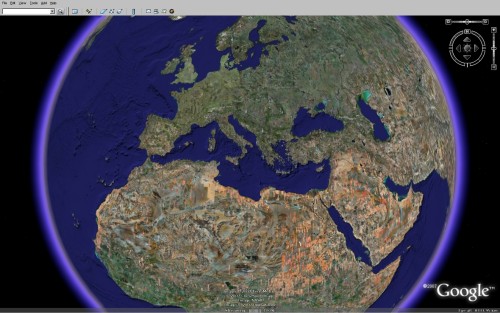
Start the installation by downloading the Linux installer.
Open a terminal and change to the directory where the installer downloaded to. If it’s on your desktop you can use this command:
cd ~/Desktop
Change the permissions on the installer so you can run it:
chmod +x GoogleEarthLinux.bin
Run the installer as the root user:
sudo ./GoogleEarthLinux.bin
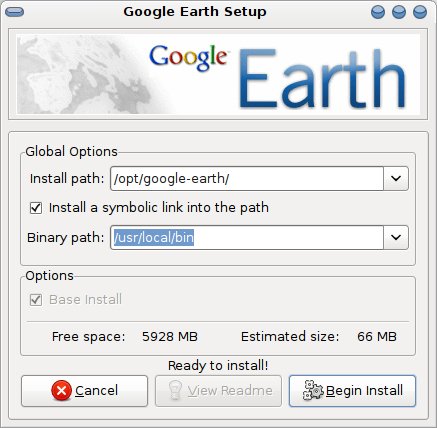
The installer dialog will open. The default install paths work fine. Click
Begin Install.
Once the installation is finished you can click Start to launch Google Earth.
Want to add Google Earth to the Application menu? Open the menu editor in
System->Preferences->Main Menu.
Select the submenu you want to use and click New Item. The command value needs
to be googleearth.
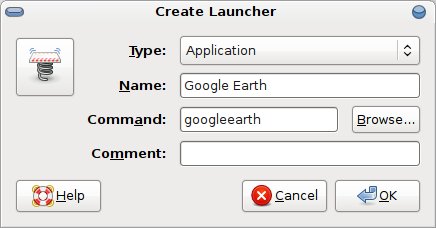
You can now launch Google Earth from the Application menu.
[update] You may also be interested in improving Google Earth’s appearance.
Archived Comments
Nico
Or alternatively use the Medibuntu non-free repository:
http://www.medibuntu.org/packages.php
googleearth 4.2.198.2451-0medibuntu4
- sudo apt-get install googleearth
:)
Nico
Philip
Funny, I’m hoping to upgrade my system to 7.10 shortly on a new machine and was
just a few minutes ago thinking of installing Google Earth with the extra power
and space I’ll have.
One for the bookmarks.
Thanks.
Anonymous
look due i know your probly doing this for the good of your health but can u
help us
i done exactly as u said but i get
Could not create directory:
/root/.googleearth/Cache
ok
i pressed ok and got
Google Earth could not write to the current cache or myplaces file location. The
values will be set as follows:
My Places Path: “/home/barry/.googleearth”
Cache Path: “/home/barry/.googleearth/Cache”
ok
Tom
popey,
I have tried the package “googleearth-package” in Ubuntu and it didn’t seem to
work.
Anonymous
Hi,
I am running Ubuntu 8.04(32-bit) on my PC and got google earth installed. If i run it i get the Error code 29 msg. I looked for and tried every solution i could find on the net but nothing seems to work. It seems like installing lib32nss-mdns worked for most people so i tried it. I only get the following msg:
Reading package lists… Done
Building dependency tree
Reading state information… Done
E:Couldn’t find package lib32nss-mdns
I then realized it probably only works for Ubuntu(64-bit).
Does anyone have any advice? I’m a noob on linux and have no clue where to even
start.
Thank you in advance.
deantn
Having a major problem with this install, after installing and trying to launch GooleEarth all it does is restart my computer.
crreddy
After installing using .bin once invoke the command googleearth all it does is restart the system and take me to login window
ru-snark
Thanks! Nice and clear, just like I love it! You doing a great job!
nick staib
Thanks Tom!
After endless frustrations with delays opening, running, and closing Vista on a new laptop - I have consigned Vista to digital oblivion and installed Ubuntu.
What a difference - blistering speed - no delays anywhere :-)
Googling for help getting VLC and then Googleearth running I noticed that your blog came up - and was most helpful…
Have bookmarked and will now browse your site for more gems…
Cheers, Nick
Cardinals Nation
Excellent tutorial! Perfectly clear with spot-on accuracy.
Thank you very much for making my transition to Linux just that much easier.
Neville
After installing using .bin once invoke the command googleearth all it does is restart the system and take me to login window; am using ubuntu 7.10
Jougukny
This is exactly what i was looking for. Thank you for your clear instructions.
songstruck
Running Gutsy on an old 486 Dell. Installed using the binary, per your instructions. GoogleEarth launched automatically after the install and worked great.
A menu entry was added automatically. Subsequent launches from menu or from terminal opened the GoogleEarth application, but I could not navigate anywhere. The image is “stuck” on a sky view (the last image from my first use of GoogleEarth).
Now I cannot return to the ground view or anywhere. Toolbar icons are all gray, nothing appears in Places, etc. The View menu does not contain the original “view from..” options.
Help!
Anonymous
to songstruck
Had a similar problem. Googleearth doesn’t run properly unless I ran it as root. Then everything worked. I don’t know why it isn’t documented anywhere. But I think because it has on the fly resolution and graphics changes, it needs to run as sudo. Because unless I do that, like you, its stuck in sky view and i can’t even edit any preferences. But I tried all types of installing as user, as root, as root with the privileges going to the user, and it still doesn’t work unless I gksu or sudo before googleearth
Ronald Chacón
Hi, i’ve just install it but it doesn’t work
Anonymous
Thanks for making this easy!
joao
I’ve installed google earth on hardy and it says it cant connect to the internet even though I have no firewall active and I have a good and working connection.
I had google earth in gutsy and all was well. This problem started after the update.
Sugestions?
Ryan
I tried what you told me to do on terminal, however it doesn’t work, could you help me please?
champ
Thank you very much
xRes
Thanks, Worked like a charm on my Ubuntu 8.04 laptop!
Jeff Morgan
To Songstruck and Anonymus,
The same thing happened to me. Google Earth worked fin on the first lauch during the install, however, when launching from Applications, it remains stuck in “starland”. I can launch it correctly from a terminal window using sudo googleearth. Any thoughts on how to fix?
Anonymous
Excellent, succinct directions - Thanks!
8.04 Mine also has problems running, needs to be run from root (sudo googleearth) and even then is agonizingly slow, on a pretty fast ‘puter. (2.4G Dualie w/2 gigs of ram) I’m thinking the Integrated Intel Graphics (Media Accelerator 900) is the cause of the problem, so will put in a stand-alone card and give it another go.
But thanks again!
alop
Here’s how to fix the “only works with sudo” problem
in your homedir, cd .config/Google, then do ‘sudo chown [you user name]
GoogleEarthPlus.conf’
Next time you run googleearth, it’ll show you an error message about not being able to write to /root/.googleearth, and that it will use your homedir instead…
Hope this helps others!
Hans
Strange .. In the Synaptic package manager I only find a google earth debian package utility. I cannot find the GoogleEarth app itself there. Am I doing something wrong?
troyius
Add the repository to your sources.list.d Go here for instructions - add the non-free repo.
Graham
Ok.. Thanks for tips people particularly last sudo chown tip.. No more starfield.. wondered why it needed sudo to install anyway.
My problem now is…. Unless I keep moving the mouse I get a black bar kinda thing at the top of the screen.
ati graphics here 9800 pro (128mb) .. probably AGP on a K8T Neo mobo
David
doesn t work. Brings up error message 29
rach
After installing and trying to launch GooleEarth all it does is take me to user name and password.
Anonymous
Thanks, worked perfectly, step by step, just did not required to Add to the menu (is itself listed itself over there). Thanks again
Chris
I loaded as you instructed but I am unhappy with outcome. Can you explain how to remove. Root is owner and I do not know how to do the uninstall. I can find uninstall file but ubuntu says it is not a valid uninstaller.
Please help. Thank you.
trubkir
had a problem with error 29 with 64bit Ubuntu 8.04.01. A search revealed that the lib32nss-mdns package had to be installed which fixed the problem in my case
Ian
Thanks - the ‘chown the config file’ trick from chop works for me.
Dear Google, please do this in the install script :)
khatib nedjar
thank you everybody its ok wonderfull commands
first chmod +x GoogleEarthLinux.bin
then ./GoogleEarthLinux.bin
roemer
Who can help?
I installed GoogleEarth in Ubuntu 8.04.1.
If I start the program, I get the error code 29 and the hint that network
connection to www.google.de can not be reached or the firewall does not allow
the connection. Howevwe I have no external firewall and with Firefox I may open
www.google.de
What is wrong in my installation?
lux
If you have problems with the installation using the sudo command googleearth-package it is easy to remove! ( sudo apt-get remove googleearth-package ) And yesterday the commands at the top of the page worked fine for installing GE on my 64 bit distro and it was awesome then I was attacked and the pictures I saved from GE and my addon background images were stolen off my pc then a command app popped up removing my installation and it wouldn’t reinstall. Needless to say I reinstalled the os and retried and it says it can’t open the 64 bit installation files for GE. Really crazy and I’m not too happy!
Anonymous
Thank you, very helpful!
55rebel
Thanks! trubkir,
Installing that lib32nss-mdns package, did the trick – You rock!
Peace
chuggaboo
Hey– I have a random question.
What Emerald/Metacity theme do you use?
I just think it looks cool. ^_^
Tom
chuggaboo:
The theme is “Milk flat - darker blue”:
http://gnome-look.org/content/show.php/Milk+flat+-+darker+blue?content=64535
Rservoss
Installed fine on Ubuntu 8.10 beta but will not work
seems OK but viewer is black and stays that way. Program crashed. used
GoogleEarthLinux.bin from their download site. Everex explora machine.
Google maps works fine.
Anonymous
says installation completely crashed for AMD…… I have Ubuntu 8.10 on my AMD 64
Matt2c
HEY! Where do you come off making an installation in Linux EASY! It’s supposed
to be a pain in the kazoo so that you would go to bed and stay up all night
wondering what it’s going to take to install that stoopid GoogleEarth.Then you
go to a
forum and most of the people reply to you like your some kind of Idiot. this is
the only time I’ve seen it clearly and concisely explained for us people who are
still at the bottom of the learning curve. Thanks a million.
gdgfbgd
sou uns fills deputa
Anonymous
correction
sudo apt-get install googleearth-package
Amann
This is a very good information here!
thanks
Anonymous
after finished install google earth i try to to launch this application, then show warning like this
“are you blocking opt/google-earth/googleearth-bin?”
how to set the firewall alow googleearth in ubuntu
kunal
thanx a lot ….i recently joined the linux resolution and was looking for google earth…it’s working on my machin but with problems….but its good to have it on my pc….thanx again
mrcneri
How come that after the installation if I run google earth everything is fine and if I open it the second time it doesn’t work ?
mr wright
How can I see Google Earth in real time?Is that possible?
Anarres
Thank ypu very much! Very useful help. Ubuntu 8.10 user.
Anonymous
but i can’t use it
it is showing initializing
then it disappears.
berlocnik
i have problem with google earth,when i run google in root i get this problem
Warning: Unable to create prefs directory ‘/root/.googleearth’. File exists.
./googleearth-bin: relocation error: /usr/lib/i686/cmov/libssl.so.0.9.8: symbol
BIO_test_flags, version OPENSSL_0.9.8 not defined in file libcrypto.so.0.9.8
with link time reference.Somevan help
ggb
Followed your instructions and installed in Ubuntu 8.1 – got this message at install
Warning: Unable to create prefs directory ‘/root/.googleearth’. File exists. ./googleearth-bin: relocation error: /usr/lib/i686/cmov/libssl.so.0.9.8: symbol BIO test_flags, version OPENSSL_0.9.8 not defined in file libcrypto.so.0.9.8 with link time reference
When try to start Google Earth, there is a ‘startup tips’ screen which is blank and then the Google Earth Screen and then it disappears.
Any ideas about this?
Anonymous
ubuntu is fine and all, but why the hell do you have to go through all these command lines. this is not user friendly and as long as linux systems are like this, it will never surpass mac or windows
raj
thanks tom
Anonymous
oh yeah, thanks for installation tips, i’m not really into ubuntu yet
Anonymous
Read here for the solution!
http://www.google.com/support/forum/p/earth/thread?tid=7b1b524777b9b982&hl=en
Anonymous
I note that other people have had the same prob but I can’t seem to see that a resolution has been posted.
When I start Google Earth I get Could not create directory /root/.googleearth/Cache
Any help please?
Thanks chaps
parveensons
can i see my house in selite
Anonymous
yeah thats the way
;)
Anonymous
Thanks alop for the chown tip. Had a blank Google Earth. Now it’s working with
Ubuntu 8.10 on an Asus eee 700.
Really sluggish though. Well, I know the screen resolution is too low, but I had
to try.
at least could use it to directions.
Anonymous
I love linux because of all the people who contribute here and all over the internet. I wish I grow up to be like one of them!
paulo
HI google earth do you now if we go on your web site their is going to be a list
like some is like this google earth or google earth download 50 or last one
google earth upgrate.witch one do you pick to upgrate to go on the globe
that you can move around and if you tipe your address
you can see your house.I would love to now.
Anonymous
IM using Kubuntu 9⁄04 and it works.
Thanks a lot.
Still cant figure out why there isnt a GUI based program that does this if you
click on it.
I can copy/paste with the best of them and the terminal doesnt scare me but
user-friendly it isnt.
Anonymous
If you installed with Mr. Tom’s method….you may have some problems with root.
I did his method and it went south just like many of the post here.
To unistall this mess; use the following commands.
cd /opt/google-earth
sudo su
./uninstall
Then add medibuntu to your repositories and install with Synaptic and stop with all this Tomfoolery.
Anonymous
hey
thanks for your help install it fine on ubuntu 8.4
but i wayyyyyyyyyyyy to slow on eeepc 900
it not mermory cause on ubuntu 8.4 had 512 mb eeepc 900 has a gb
i think it might be graphics has any 1 had this prob
TDurden1937
I’ve read through this entire thread … some of the problems, like getting a message cannot create file /root/.googleearth probably is because ya had or tried to install Google Earth previously and the installation was aborted or something. However …
Be that as it may be (after deleting all remains of any previous Google Earth installation), I followed the directions as posted EXACTLY on my Ubuntu 9.04 Jaunty, and the first time it started it ran okay with no error messages. However, the start icon on the desktop did not have an graphic on it.
The second time I started it I got the same old crap about cannot create /root/.googleearth and /root/.googleearth/Cache.
I can still use it … and I’m satisfied. Even with the small irritations which Linux presents, I prefer it 10 times over WindoZe Bloze Up.
But what one previous comment mentioned is true … until Linux in all its varieties gets it together and standardizes installation packages and all the other small problems which are mere irritation to us seasoned Linux uses, Linux will NEVER, NEVER become main stream, which is a shame because it is such a superior operating system.
Also, let me mention that Ubuntu is very simple to install and maintain … compare to some distro’s. I used Slackware for many years … believe me the irritations we have to solve are minor compared to the advanced distro’s like Slacware.
hari
thnxs this is excellent
qwerty
yes, this method is so easy to install, by these are too many indecipherable character on user interface (simple Chinese). I didn’t know why, that cause me anxiety because I am a beginner just touch Linux 2 weeks….. I want to fix or remove it. can sb told me HOW TO DO IT?
me
does any1 know how to install google earth on eee pc 900 linux
Indian-Art
Thanks wonderful instruction!
Before I read your website I was stuck with the Google earth .bin file on my desktop.
I installed it on Ubuntu 9.04 and it automatically had the Google earth icon launcher under Applications> Internet.
I didn’t need to follow your last step for the launcher.
Anonymous
Right click on dowmloaded file and choose “Open with other application, then click on “Use a custom command”, then tpye in “sh” (without quotation marks. Should work everytime.
ali
this is very good thanks
ANISH------
what does {.Change the permissions on the installer so you can run it:} means?
Martin
THANKS MAN!!!! NOW I GOT GOOGLE EARTH ON MY UBUNTU!
Tusker
Thank you for this great tutorial. There is one googleearth package in synaptic package manager to built it automatically in debian/ubuntu which is a free software but google earth itself is governed by some copyrights like you can not redistribute it without permisison etc.
suman
it is very wonderful
joydeep Choudhury
I want to see google earth
miranda
es muj bonito
Gaurav Waghmare
thanks a lot man.
edward
thanks!
Dharamjeet
wine window program loader works easy to install programs.
saba
hi…
I am download googleearth.bin file. then i installed it.
then i get following bug…
/root/.googleearth/crashlogs/crashlog-4c4abce0.txt
Please include this file if you submit a bug report to Google.
help me….
thanks in advance…
stan w
I have installed it 3 different ways, and,
I keep getting this:
ner@904ubuntu:~/Desktop$ chmod +x GoogleEarthLinux.bin
ner@904ubuntu:~/Desktop$ sudo ./GoogleEarthLinux.bin
[sudo] password for ner:
Verifying archive integrity… All good.
Uncompressing Google Earth for GNU/Linux
5.2.1.1329……………………………………………………..
loki_setup: Suspect size value for option option
loki_setup: Suspect size value for option option
loki_setup: Suspect size value for option option
Installing mimetypes…
Installing desktop menu entries…
Installing desktop icon…
Fatal error in __driConfigOptions line 1, column 0: unknown encoding.
Google Earth has caught signal 6.
We apologize for the inconvenience, but Google Earth has crashed.
This is a bug in the program, and should never happen under normal
circumstances. A bug report and debugging data have been written
to this text file:
/root/.googleearth/crashlogs/crashlog-4c69dcad.txt
the familiar splash screen of Google Earth comes on for a sec, then does a Jimmy Hoffa…
Farhan
Thanks man God Bless U :)
Jeff K
@Stan W: I’m getting the very same problem. Has anyone solved this?
kyy
root@kingyoo-Precision-M4400:/home/kingyoo/????# sudo
./GoogleEarthLinux.binVerifying archive integrity… All good.
Uncompressing Google Earth for GNU/Linux
5.2.1.1588……………………………………………………..
setup.data/setup.xml:1: parser error : Document is empty
^
setup.data/setup.xml:1: parser error : Start tag expected, ‘<’ not found
^
Couldn’t load ‘setup.data/setup.xml’
root@kingyoo-Precision-M4400:/home/kingyoo/????# ^C
Matthew Myatt
Help..
Unbuntu 10.10 32 bit, trying to install Google Earth.
I am new to Linux so go easy on me. I have download the bin file and followed the instructions and this is whats happens. It does the same if I run from Desktop using the sh command.
master@Lenovo-G550:~$ cd Downloads
master@Lenovo-G550:~/Downloads$ chmod +x GoogleEarthLinux.bin
master@Lenovo-G550:~/Downloads$ sudo ./GoogleEarthLinux.bin
[sudo] password for master:
Verifying archive integrity… All good.
Uncompressing Google Earth for GNU/Linux
6.0.1.2032…………………………………………………………………………………
setup.data/setup.xml:1: parser error : Document is empty
^
setup.data/setup.xml:1: parser error : Start tag expected, ‘<’ not found
^
Couldn’t load ‘setup.data/setup.xml’
master@Lenovo-G550:~/Downloads$
Whats going on.??
pete
download from google website
right click on file than,
install whith ubuntu software centre
in right upper corner click on install
root password
all done
enjoy
popey
Google Earth is in the Ubuntu repo in 7.10 (gutsy) and 8.04 (hardy).
http://packages.ubuntu.com/cgi-bin/search_packages.pl?keywords=googleearth&searchon=names&subword=1&version=all&release=all
So on Gutsy and Hardy you just need to “sudo apt-get install googleearth” which is preferable over installing the binary downloaded off the web.