
How-to Install Fonts in Ubuntu
[update] This process has changed in Ubuntu 8.04 and higher. See How to Install Fonts in Ubuntu 8.04 for updated instructions.
Want to add some fonts you downloaded to your Ubuntu system? The Nautilus file manager includes an interface for adding fonts. Using Nautilus is the easiest way to add fonts to Ubuntu.
Press Alt-F2 to open the run dialog. Type the following into the text box and
click “Run”.
fonts://
The window that opens allows you to copy and paste new font files to install them.
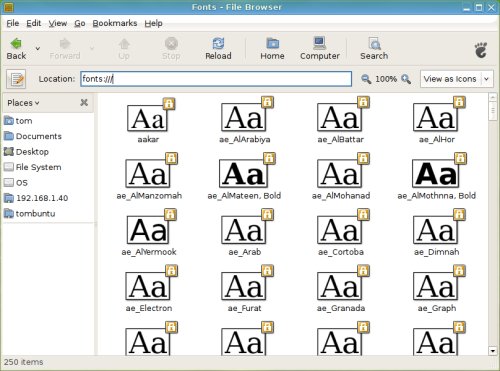
For applications to see new fonts they needs to be restarted. If you are looking for a font, I would recommend Dafont.
Archived Comments
Tom
Devo,
I didn’t try that, but it should work.
Ummm? seriously!?
Isn’t there any other method to install fonts under Gnome?. That’s pathetic. They have a lot to learn form KDE.
Peter Gasston
You can do the same thing by just typing that address straight into the Nautilus address bar.
What Gnome really needs is a font manager like Suitcase, where you can install fonts temporarily rather than having a hugely inflated fonts folder. Fonty Python is the best I’ve seen so far, but development seems to have stalled.
@Devo4343: Yes, you can.
nass
Thank you!!!
gerezs
A good way to start copying fnts:
http://ubuntu.wordpress.com/2005/09/09/installing-microsoft-fonts/
This is needed from this post/article.
Anonymous
cool, Just what i was looking for - thanks, going uder my bookmarks
Anonymous
doesnt work for me on Hardy.
Pako
Press alt+F2 and type: gksu nautilus /usr/share/fonts/truetype,
then open ttf folder and paste your fonts. That’s all!
Tom
Anonymous:
See the top of this post for a link to updated instructions.
Ricebowl
@Pako - Thanks, man; I thought I was missing something when the version outlined didn’t work for me (and since I’m new to ‘nix figured it was my fault…). Yours worked like a charm, sir, thanks again!
R. Jayaram
Fonts of other languages appear in english in openoffice org 2.4. How to install these properly?
Jayaram
Angel Mass
Not working for me on Ubuntu 8.10, I got this:
Couldn’t display “fonts:///”.
Nautilus cannot handle fonts: locations.
moshfiq
this not worked in ubuntu 8.04, same problem like Angel said :(
Tom
Angel Mass & moshfiq:
See the updated instructions for Ubuntu 8.04 and higher:
http://tombuntu.com/index.php/2008/04/17/how-to-install-fonts-in-ubuntu-804/
Bipin Baglung
Only pako’s idea solved my problem
Thank you a lot. Simple and greatest idea. I had tried a lot already but failed.
Anonymous
well i am not able to run doc files with chess fonts even after installing files
in usr/share/fonts/truetype
don’t know why is this happening but it is
s3v3n
Make a folder named .fonts in your home folder and paste all .ttf fonts there
you also could copy them from windows\fonts . That’s all :)
P.S. May be you should activate “Show hidden files” by pressing CTRL+H
Enjoy :)
Devo4343
Are you able to take fonts from your windows font folder and add them to Ubuntu?