
Download and Install BitDefender antivirus on Ubuntu with 1 year free license
This guest article was written by Vivek Kumar from LinuxHub.net, a blog focused on Linux tutorials (how-to’s), technology and news.
One great advantage of using Linux (Ubuntu) is the fact that you don’t really have to worry about security and hence viruses. However, this does not mean that you should not use an anti-virus on your Ubuntu machine. Especially when you can get a good anit-virus for free. BitDefender for Unices is one such anti-virus solution for Linux and you can get it for free. Let’s see how to get a free license of BitDefender anti-virus for your Ubuntu machine and how to install it on your Ubuntu machine.
BitDefender Antivirus Scanner for Unices is a versatile on-demand scanner built for Linux and FreeBSD systems. It provides antivirus and antispyware scanning for both UNIX-based and Windows-based partitions.
BitDefender Antivirus Scanner for Unices is highly customizable and capable of script and extension-based integration with various applications such as file managers and mail clients.
Get a free home license for BitDefender
Before we download and install BitDefender on Ubuntu, let’s first get a free
license copy of BitDefender. Please remember that the free copy of BitDefender
is only for non-commercial home usage. In case you want to use it for business
purpose please get a valid license. In order to request a free license go to the
following page:
http://www.bitdefender.com/site/Products/ScannerLicense/
Fill in the information and accept the license agreement to get the license key to your email.
Download Free BitDefender Antivirus for Linux
- On the following page, click download, enter your details to download the
free BitDefender
antivirus:
http://www.bitdefender.com/PRODUCT-80-en--BitDefender-Antivirus-Scanner-for-Unices.html - Once you have filled the information the download link will be sent to your email address.
- Click the download link that you received in your email and click
BitDefender Antivirus scanner for Unices (Linux, FreeBSD). - On the next page click
Download. - Click
EN_FR_BR_RO/and clickLinuxon the following page. - You’ll see many links on the page. Depending on the version of Linux and
your OS (32 or 64 bit), you can download the files. In our case we’ll
download the following
file:
BitDefender-Antivirus-Scanner-7.6-4.linux-gcc4x.i586.deb.run
Install the downloaded BitDefender anti-virus
Hit Alt+F2 to bring up the run prompt. Type “gnome-terminal” to open a terminal window.
Go to the directory where you download the file (In my case it is MyDownloads).
cd MyDownloadsType the following command
sudo sh BitDefender-Antivirus-Scanner-7.6-4.linux-gcc4x.i586.deb.runYou’ll be prompted with the end user licence agreement. At the end of the license type “accept” (without quotes). This will begin the installation of BitDefender antivirus on your machine.
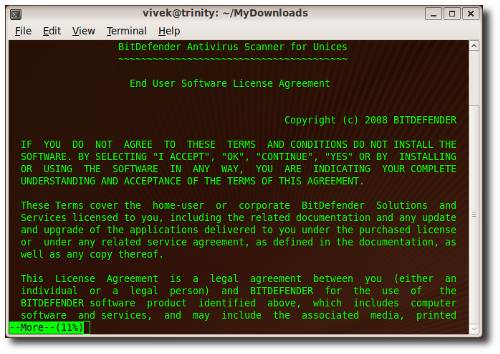
Running Bitdefender
- After you have successfully installed the anti-virus go to
Applications->System Tools->BitDefender Scannerto see the anti-virus in action. - Enter the free key that you requested and received in your email to get the free 1 year license.
- All that is left is to update your anti-virus and to run a scan.
We hope this will make your Ubuntu installation better secured.
If you want more tutorials and technology articles like this one, you can subscribe to the LinuxHub RSS Feed.
Archived Comments
James
Quote: “One great advantage of using Linux (Ubuntu) is the fact that you don’t really have to worry about security and hence viruses. However, this does not mean that you should not use an anti-virus on your Ubuntu machine.”
Wait, why?
Charles
Being immune to most viruses whilst in the proximity of those that aren’t puts everyone else at risk. The case of Mary Mallon, aka Typhoid Mary, is probably a helpful analogy.
Additionally a linux based virus scanner comes in handy when someone has a very ill windows machine, it’s a nice place of safety to scan from and allows the the rest of the hardware to be tested whilst the valuables are tarballed away somewhere.
And probably the most common use of a linux/unix virus scanner is piped into a mailserver checking e-mail for nasties.
Mike
Come on. Seriously?
I know alot of us come from PC background where the price of security means getting a decent antivirus program (for free typically. Not this one-year-trial-bs). But unless you’re terribly careless, there is practically no worthwhile use for an anti-virus program (that is free for one year only, mind [and wtf is that about?]) on ubuntu.
The only reason I can possibly think one would be useful would be in the case of downloading files onto a linux system and then transferring them over to windows; however, if that’s the case, your windows machine should have a decent, and updated, anti-virus to do the job.
Please. Try again.
Anonymous
One obvious thing is missing from the post: What is the purpose?
Mosh
If you’re hosting files on your Linux machine that could be distributed to a Windows/Mac then it makes sense to scan them where they’re safe.
I dual-boot most of my machines, but do the lion’s share of work under Ubuntu/Eeebuntu. It wouldn’t be impossible to download a file under *nix which seemed fine. Obviously, no antivirus or ill effects.
Grab said file under the Windows install, or distribute it over your network to Windows boxes, however…
Also useful for fileservers where Windows users store their files. It stops the spread from the host client via the server.
Tux
“Wait, why?”
@James,
To be able to scan your other partition for viruses when you can’t boot into it
(because of those viruses).
Jay
I am with James on this one… Why should we run it again? Will it help with wine programs? Will it do anything that we need? What is the point.. Also its on demand. So you have to run it to see if you have a virus… Back in the dos days I guess this would be useful.
Jay
Sorry if it reads like a troll comment… Not my intention.
naziru yahya
to down load
JohnCC
I hope I’m not excessively picky about grammar, but the source site (linuxhub.net) is generally so badly written that it spoils the content.
Vivek
Thanks folks for dropping your valuable comments. I’d politely like to clear few things. The post is a how-to and it was not intended to generate a debate on why you need the AV on Linux. However, I am enjoying the conversation :)
adzik
Hmmm…don’t see the point.
Centralized networks in corporate environments would have no use for this,
average buntu/linux users would have no use for this…
And if your Windows install has been hosed by a virus, I haven’t had the
pleasure of being able to get a machine like this started again and not have to
re-image the system anyway (due to the virus have done so enough damage
already).
Either bitdefender is fishing for something, or they think the ubuntu community
is stupid.
Tapas Bose
Thank you. This will help me to remove viruses from my Windows xp. Thank you again..
Sean Tomlinson
You might want to clarify that this does not seem to be a unconditional 365 day year license. Upon my posession of a key and installation same day, I was only given a 297 day license. So, I will guess these licenses are only up to a certain date. I will be contacting BitDefender for further clarification.
ashwani
download bitdefender
mukesh
i want to use in windows xp..
airtonix
anti-virus industry breeds off your fear.
digital fearmongers.
n1z3r
hey.. it is a linux AV then is it able to remove virus of windows?remove virus of windows xp? but i needs updated…
AKSHAY
The instruction was really helpful. but after installation is complete then when
i am trying to update it its giving a server error. Due you have any
suggestions.
thx for installation help.
sunil
good very good
Jo
I’ve installed the deb.run package. It was installed on Ubuntu 8.04 on /opt. I started the gui on /opt/BitDefender-scanner/bin/bdgui as user. I add the new key and scanned my computer and all works very well. Thank you for your very good description!
Jo
Prometeo Lucifer
I am install with this metod
http://www.elleonplateadodeojosrojos.es/blog/bitdefender-antivirus-scanner-for-unices/
Anonymous
thank u
Ameya
has bitdefender discontinued support for this product.. the virus defs have not been updated from like mid october
free advertising
the download is this software to a long time…
MentalNotes
I prefer to use ClamAV (http://www.clamav.net/). It’s GPL licensed, has regular updates, and is in most distro’s repositories.
Brian P. Freeman
Hi, I am Brian and I am new to Ubuntu Linux but not new to IT and PCs or software. I am trying to install BitDefender for Ubuntu 8.04 using the sudo sh command shown earlier for the .deb.run file from the BitDefender web page. When I run the code, I get this output….
**********
Please enter “accept” if you agree to the License Agreement.
Enter anything else if you don’t agree to the terms in the License Agreement.
The installation process will stop.
accept
Installing BitDefender Antivirus Scanner v7.6.4
dpkg: error processing bitdefender-scanner_7.6-4_i386.deb (–install):
package architecture (i386) does not match system (lpia)
Errors were encountered while processing:
bitdefender-scanner_7.6-4_i386.deb
Could not complete the installation of the package, aborting.
**********
What am I doing wrong? Can anyone set me in the right direction here? Thanks folks!
Gautham
hi i got another easy way ….visit http://linuxtree.blogspot.com/2010/01/how-to-install-bitdefender-in-ubuntu.html
khagendra prajapati
this antivirus product is the world’s best
it true.
Joel
This helped me a lot! Thanks!!
Lindsey Salazar
not bad
manish pandey
this is popular antivirus
S. Kumar
this is populer antivirus
Branden
A lot of you guys remind me of nutty Mac fans that think they are virus invincible in their Unix-based OS. lol Not according to the latest news. Malware has taken notice of OSX, Android and Linux too… A trojan almost went unnoticed for two years in Linux, but you don’t need an OS.If I were you, I’d be smart and download an good anti-virus suites on all my OSs.
Branden
…you don’t need anti-virus software.* typo
LinuxMania
look guys, no point arguing about the said so product. It is what it was created for which are matters. For those who don’t believed in using it, as you pleased and for those who need it, just download it and install it. Everybody happy OK guys. Just one advice for those out there. Do what you believed and hang on it. Take your chances and bare on it. Good luck.
Best Regards
LinuxMania
Tinh
Hi, great guide. I have one question as I just used Ubuntu for the first time and everything seems new to me. I did installed Bitdefender successfully but I did not see its icon at Applications->System Tools->BitDefender Scanner. How can I find Bitdefender icon and show it in desktop? Thanks
help
sudo sh BitDefender-Antivirus-Scanner-7.6-4.linux-gcc4x.i586.deb.run – is this command correct cuz am getting 5000 I/O errors.
Larry
Cannot find place to download free version. Find plenty of unnecessary information. Do not need business version.Do not need desk enhancer etc…
rahu
hi, i have just installed bit defender in ubuntu..but program is not working. i had update the program after installation.
its showing ..engines is not loaded
please help me !!
abraham
thanks man you were the only one that made it from all the chances i took to install it
jen
I am trying to download BitDefender, I received the license key and clicked on the link in the email. I browsed to the Linux folder and clicked on the .i586.deb.run file, but it just changes the browser to show the code, I don’t think it is downloading. What should I see after clicking on the .deb file?
William
Bitdefender Scanner Gui 1.0-4 worked great on Linux and its appearance is pretty good. I just hope that this project keep on.
Many thanks.
gianluca
hi.. I did a scan and the program says to me “ 3396 I/O errors” is it crazy? or it’s a normal thing?
Spicy
after installed it works but the next times i used it it says that it is loqding the antivrus engine and then nothing happen. help
ubuntu 12, 32 and 64 bits
Devasish Gupta
Thank You. Just installed BitDefender after reading your tutorial.
It was so simple and very well explained/
Elaine
Thanks for this. I want to install it on a netbook running on Peppermint 4 Os. I’ve had the email with the licence key and the link to the download page, but don’t know which link is suitable for Peppermint 4. Could you advise please?! The options are:
Please don’t shout at me! But I’d like to try downloading the free bitdefender. I registered and was sent the email with the license key in and a link to the download section, which has a list of downloads, depending on which version of Linux you are using.
So my question is - which link do I need? According to an article by a Mint user, the one for Mint is [color=#4000BF]BitDefender-Antivirus-Scanner-7.6-4.linux-gcc4x.i586.deb.run[/color] and i just wondered if this was the same one to use for Peppermint 4 Os. Or one of the others?
BitDefender-Antivirus-Scanner-7.6-4.linux-gcc4x.amd64.deb.run
BitDefender-Antivirus-Scanner-7.6-4.linux-gcc4x.amd64.deb.run.md5
BitDefender-Antivirus-Scanner-7.6-4.linux-gcc4x.amd64.ipk.run
BitDefender-Antivirus-Scanner-7.6-4.linux-gcc4x.amd64.ipk.run.md5
BitDefender-Antivirus-Scanner-7.6-4.linux-gcc4x.amd64.rpm.run
BitDefender-Antivirus-Scanner-7.6-4.linux-gcc4x.amd64.rpm.run.md5
BitDefender-Antivirus-Scanner-7.6-4.linux-gcc4x.i586.deb.run
BitDefender-Antivirus-Scanner-7.6-4.linux-gcc4x.i586.deb.run.md5
BitDefender-Antivirus-Scanner-7.6-4.linux-gcc4x.i586.ipk.run
BitDefender-Antivirus-Scanner-7.6-4.linux-gcc4x.i586.ipk.run.md5
BitDefender-Antivirus-Scanner-7.6-4.linux-gcc4x.i586.rpm.run
BitDefender-Antivirus-Scanner-7.6-4.linux-gcc4x.i586.rpm.run.md5
BitDefender-Antivirus-Scanner-nogui-7.6-4.linux-gcc3x.i586.deb.run
BitDefender-Antivirus-Scanner-nogui-7.6-4.linux-gcc3x.i586.deb.run.md5
BitDefender-Antivirus-Scanner-nogui-7.6-4.linux-gcc3x.i586.ipk.run
BitDefender-Antivirus-Scanner-nogui-7.6-4.linux-gcc3x.i586.ipk.run.md5
BitDefender-Antivirus-Scanner-nogui-7.6-4.linux-gcc3x.i586.rpm.run
BitDefender-Antivirus-Scanner-nogui-7.6-4.linux-gcc3x.i586.rpm.run.md5
Thanks.
Elaine
PS - Ignore that second paragraph! I cut and pasted the links from another post on a Linux site, where it seemed frowned upon to even mention antivirus!
edcen
I am using dual boot ubuntu for internet and win XP for games. Even if I deep-freeze win XP, virus can creep in through ubuntu. I need a deep-freeze like for my ubuntu which will also protect my win XP files.
nenelinux
nah a antivirus in linux is useless