
3D Acceleration and Compiz Inside VirtualBox Guests
Sun has just released the major 2.2 update to their VirtualBox virtualization software. The most exciting new feature in this release is 3D acceleration for Linux guest operating systems! See the changelog for all the new features and fixes.
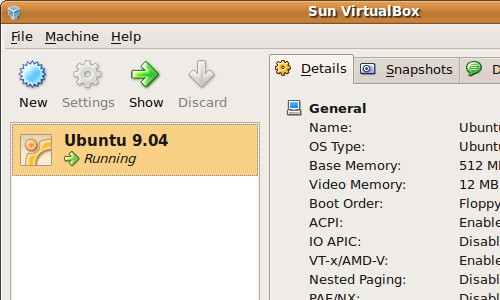
Install VirtualBox
VirtualBox offers Ubuntu package downloads as well as a software repository from their Linux downloads page. Neither of these options have been updated for Ubuntu 9.04 yet, so I just downloaded and installed the 8.10 package for now.
Start VirtualBox from Applications->System Tools->Sun VirtualBox.
Install Guest Additions
Here’s how I installed the VirtualBox guest additions in an Ubuntu 9.04 guest.
Start up your Ubuntu guest OS. In VirtualBox, click Devices->Install Guest
Additions.
Click Run when the autorun prompt opens in the guest. The installation could
take a minute while kernel modules are being built. When it’s finished, the
installer should prompt you to reboot the guest.
Shared Folders
I wanted to copy some files into my Ubuntu 9.04 virtual machine using VirtualBox’s shared folders feature. It isn’t obvious how to do this, and a bug also complicates things.
Set up a shared folder in VirtualBox and make sure you have the guest additions installed in your guest. In the guest, open a terminal and use this command to mount the share:
sudo mount -t vboxsf shared_folder_name mount_point
If this gives you a protocol error message, you’ll need to get a root prompt to work around this bug. Use the commands below to do this:
sudo -i
mount -t vboxsf shared_folder_name mount_point
Press Ctrl-D to exit the root prompt when you’re done. Your shared folder should now to available from the mount point you specified.
3D Acceleration
To take advantage of 3D acceleration in your guest operating systems, you’ll need to first install the VirtualBox guest additions. Then, open the settings for your virtual machine and enable the 3D acceleration option.
I tried out the 3D acceleration with an Ubuntu 9.04 guest running on an Ubuntu 9.04 host with the Nvidia graphics driver. After enabling 3D, the guest detected it and started up Compiz.
Compiz runs smoothly on the guest, including intensive effects such as wobbly windows. I encountered a few graphical glitches. As seen below, transparency seems to be a problem for some windows:
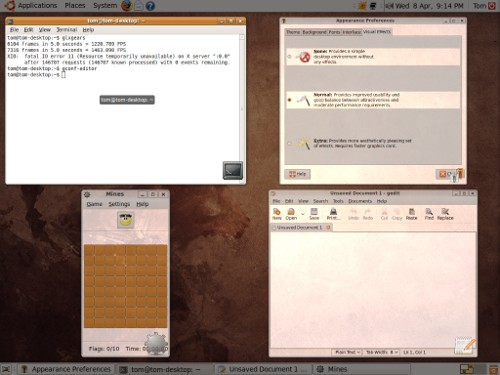
I tried the 3D game Nexuiz, running the game just produced a blank screen. Google Earth was sluggish at first, but after turning down the graphics settings it was completely usable.
I have had one virtual machine crash when pasting text copied from the guest, but no stability problems with the 3D acceleration so far.
Archived Comments
Hund
Doesn’t matter which version I install, VirtualBox just wont show up in the menu.. And there is no commando to start it in the terminal either?
Tom
The terminal command to start VirtualBox is “VirtualBox” (case sensitive).
If the menu item is not showing up, try restarting the GNOME panel with “killall gnome-panel”.
Extraordinerd
You can get the icon to enable (if restarting the GNOME panel doesn’t work) by going into the Main Menu editor and unchecking, then re-checking the entry for VirtualBox (under System Tools by default). That got the icon showing up for me.
Ddorda
The Guest Addition doesn’t works for me.
after I run the script, Ubuntu just doesn’t want to use the Xserver.
weired.
frigaut
Thanks Tom for sharing this news. This works as advertised indeed. I have had
mixed results as far as performance though:
- OsX on an iMac (host) / jaunty as guest: runs great (as far as 3D accel).
smooth. some artefact link to transparency, as you noted.
- OsX on a thinkpad T60 (host) / jaunty as guest (yes, I know, this is
twisted): works ok, but 3D accel is kind of really slow. Probably because the
graphic card is not up to it (integrated intel GM945), or may be because the
osx86 graphic dirvers and not optimized for this kind of use.
Thanks again for the post, and thanks to the Sun engineers. Great great job. I have been waiting for 3D on guest for a while now, and it has finally arrived :-)
-z-
I got Nexuiz running with the the -safe flag but there are even more ways to tune it.
http://alientrap.org/forum/viewtopic.php?t=4460
It runs a bit sluggish.
I was really impressed with how smooth OpenArena ran: http://www.openarena.ws
Michael Miller
Even when I install guest additions and enable 3D acceleration, compiz won’t work. I did everything the article said I should do and I didn’t work. Furthermore, I have never heard of compiz working inside of any virtual machine period. I know I am going to sound harsh, but unless someone tells me what I might be doing wrong, I call bullshit on the article and its author. I have tried using both OSX, and Windows XP as a host.
WcW
VirtualBox 2.2 has OpenGL support. Compiz requires OpenGL only. Therefore, VirtualBox 2.2 has everything Compiz needs. Don’t call someone else a liar and idiot just because you have no idea what you’re doing.
Anonymous
I have both, Kubuntu (KDE4) and Ubuntu (Gnome+Compiz) running with full 3d effects inside Virtuabox with a Vista Host and I gota tell you, IT RUNS BEAUTIFULY, so, stop saying the article is bullshit.
Alan Bourke
Michael, I can guarantee you I have it working on two seperate VirtualBox Ubuntu 9.04 guests on two seperate XP host machines!
I didn’t do anything different than suggested above.
chaotic blogging
@Michael Miller
First off this does work, and I have been utilizing it for a few months without
any problems. Before you call the writers work “Bullshit”, you may want to
perform some due deligence and research it for yourself. There is a chance that
your hardware may not be capable of pulling it off, maybe you are using an older
build of VBox(< v2.2), or your skills at troubleshooting are “Bullshit”.
Although I have been using 3D acceleration since its implementation in VirtualBox (without following this article) I can say that it DOES work and this tutorial seems to be correct. Make sure to download the app from the VirtualBox website and not from the distro repos, for the repos usually have the Open and free version which is limited in comparison from the ones provided at http://www.virtualbox.org/wiki/Downloads.
BTW nice post, very useful!
busey
does 9.04 allow 3d acceleration with ATI HD 2400
quackking
I have Jaunty on a Thinkpad T40, with ATI Radeon onboard graphics. When I start any Win guest inside VBox (2.2.4, but also previous versions > 2.1.x) I get a serious transparancy issue; I can see the Linux desktop behind any running Windows guest. Naturally this stinks.
How can I make the Windows guests 100% opaque (so the Linux desktop does not bleed through?)
Busta
I read this and wondered what the heck I was doing wrong, since I too cannot get compiz working in the guest. On the second or third reading, I realized the author is running an Ubuntu guest ON AN UBUNTU HOST.
I have one question: Why?
Has anyone got this working on a WINDOWS host?
kill
Does work very well after installing the guest the main screen wont show up it display a black empty screen
so what i think if you want linux
isntall linux without a virtual machine cause it sux with visualization
Deepak G
i’m too running ubuntu 9 as guest on my windows 7 host with virtualbox..
i’ve the latest version of virtuabox installed..
i’ve enabled the 3D acceleration feature (128mb of memory)
but as again and again i try to ebable the visual effects (conpiz) on my ubuntu guest, it says it can’t enable it..
please can anybody help me out.. :(
(for more info, i’ve core2quad with 4gb of ram WITHOUT a graphics card/gpu)
(i just 2day installed ubuntu on my friends hard disk (not virtually), who has just 256mb of ram on his system and an inferior dual core processor, and guess what, there was just no difficulty in enabling the desktop effects. he too doesn’t have any gpu installed on his machine)
PLEASE HELP SOMEONE..
works
does your friend have on board motherboard based graphics acceleration that your motherboard doesnt maybe? check your direct x drivers unders windows 7 or the windows expierence score for information about your graphics capapibilities.
you have to install the virtual box guest os additions in ubunutu also.
Sean
This is bullshit… At least for me.
It doesnt work on the MBA 1st gen… Trying now on my Quad Core Windows 7 box
with Nvidia 6600.
Is this supposed to work on Mac and Windows??
Cause so far…
It doesnt.
Sean
Okay its not bullshit.
I have it working in: Windows 7 on a Quad core with Nvidia 6600
Its kinda smooth too… the fading effect is slow, but cube and wobbly windows is great!!
Next up… Back to the Mac…
Has anyone gotten this to work on a non Nvidia machine?
Has anyone gotten this to work on a mac?
works
windows 7 -> vbox -> karmic -> compiz works for me.
works
has anyone gotten compiz to render through a rdp connection with vbox? thats how i got to this thread.
compiz works fine “locally” on a vbox hosted xubuntu install. i am trying to look at the screen via the built in hardware level virtual box rdp server with a localhost loopback.
it connects fine, shows the virtual box sytem bios and everything. but only shows the desktop background in the remote terminal.
the normal, virtualbox display works fine, and mouse / keyboard control works via remote desktop and locally too…
????
Sootie
Care to share how you actually end up getting it to work Sean?
Dan
Working perfectly on win 7 64 bit host
full compiz effects very snapy
ubuntu 9.10 guest
virtualbox ver 3.1.4 r57640
2 gig ram
q6600 quad
8800gtx ultra
alamati
Hi all,
I installed Ubuntu 10.04 in my macbook with VirtualBox, but I have one great
problem, I don’t able to change resolution sharper that 800x600, in other hand,
my original resolution in MacBook in 1280x800, and in full screen mode in
VirtualBox, ubuntu has 800x600. Also in Monitors in Prefrences, I don’t change
the resolution and my monitor in not detected. Please guide me.
Really thanks
Chicago Web Developer
Has anyone gotten this working with virtualbox on mac? I want to run ubuntu 10.4 with 3D acceleration in ubuntu but It wont find any drivers :(
ac
I had 3D working on a kubuntu 9.10 guest under a OS X host on a MacBook Pro.
Shading, effects, etc working.
Now installed ubuntu 10.04 and can not activate 3D effects. Guest additions are
installed, “Administration->Hardware Drivers” says “VirtualBox Guest Additions
for Linux Module”, VirtualBox 3D is activated, so whats the problem?
chicago web developer
Works now! The latest updates to virtual box guest additions fixed it so now there is fast 3D acceleration. I can now do all my web development and programming related stuff in geany/gvfs on ubuntu. Very nice…
Didrick
I am running Linux Mint 9 Isadora as guest in VirtualBox on a Windows 7 host, been running it for a few weeks now and almost all the Compiz effects run smoothly, except for the cube. I can spin it, but it more than often tends to have a life of its own, jumping, spinning and bouncing like crazy making me lose control of it. This never happened to me when I ran Linux in dualboot with Windsows before. I wanted to run Linux in VirtualBox so that I could have either OS available to me at all times without the need of rebooting. I love running Linux like this but I would like to know if anyone else have experienced the cube having this kind of behaviour in VirtualBox before and if there’s a way to make it spin more smoothly?
shirtees.net
Great tips, thanks. Have you tried out XP with 3D enabled? I wonder if we can run some games there now.