
Animated Wallpaper on your Ubuntu 8.10 Desktop
Have some spare CPU cycles to burn? Using a utility called XWinWrap you can use screensavers, videos, and other applications as your desktop wallpaper.
One drawback is that you will not be able to use desktop icons with XWinWrap due to a limitation in Nautilus. Compiz desktop effects are not required, but a fairly powerful computer if you don’t want reduced performance.
Install XWinWrap
XWinWrap is not available in the Ubuntu repositories, but an easily installable DEB package is available. Download and extract the zip archive, and then install the DEB package from the i386 or x86_64 folder depending on your CPU type.
XWinWrap only works properly for me once I’ve disabled desktop icons. Do so with the following command:
gconftool-2 -s '/apps/nautilus/preferences/show_desktop' --type bool false
Run this if you want to undo and enable desktop icons again:
gconftool-2 -s '/apps/nautilus/preferences/show_desktop' --type bool true
Using XWinWrap
Now you’re ready to run XWinWrap commands to create an animated wallpaper
effect. You can start XWinWrap from a terminal or from the Run Application
dialog (F2). To exit XWinWrap from the terminal, just press Ctrl-C. To exit
XWinWrap when it’s started from the Run Application dialog, run the command
below:
killall xwinwrap
While trying out different effects, remember to exit XWinWrap before starting it again.
Animated Wallpaper - Screensavers
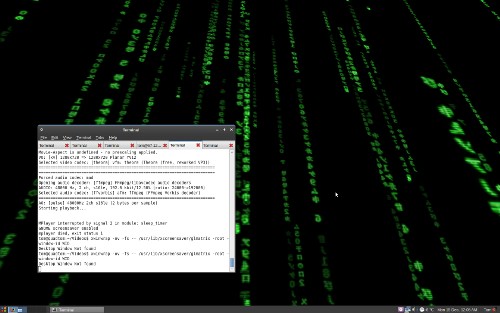
This command will start the glmatrix Matrix screensaver as your wallpaper:
xwinwrap -ov -fs -- /usr/lib/xscreensaver/glmatrix -root -window-id WID
Here a few other screensavers you can run as wallpaper for a neat effect:
Tunnel:
xwinwrap -ov -fs -- /usr/lib/xscreensaver/atunnel -window-id WIDToasters:
xwinwrap -ov -fs -- /usr/lib/xscreensaver/flyingtoasters -window-id WIDPlasma (slow speed):
xwinwrap -ov -fs -- /usr/lib/xscreensaver/plasma -window-id WID -x 30 -s 1
Animated Wallpaper - Video
Using the MPlayer video player, you can use any video with XWinWrap.
Install MPlayer from the package mplayer (click the link to install), or by running the command below in your terminal:
sudo apt-get install mplayer
This XWinWrap command will loop play the video file video.ogg:
xwinwrap -ov -fs -- mplayer -wid WID -quiet -loop 0 video.ogg
Once you’ve found an effect you like, you can add the command to the startup
programs in System->Preferences->Sessions to load it when you log in.
Archived Comments
iampriteshdesai
Holy cow!
i couldn’t acess my desktop when this thing was on.
The wallpaper would overlay the application window,
anyways what about that polaroid effect we talked about?
shirtees.net
Another alternative is the wallpaper clocks from Vlad Studio.. http://www.vladstudio.com/wallpaperclock/
He offers a few of them for free so you can try it out. Download the ones you want and use Screenlets to run it. He has over 300 wallpaper clocks, so Im sure you can find a cool you you like.
gavintlgold
@iampriteshdesai:
If you have not so good drivers that happens. You might also notice the same sort of effect with the screensaver preview app–the preview doesn’t always stay in the box where it belongs, but leaves artifacts.
I can attest that at least one of the Dell Inspiron series laptops has trouble, but nvidia cards work well with it.
Ubuntuser
“Holy cow!
i couldn’t acess my desktop when this thing was on.
The wallpaper would overlay the application window,
anyways what about that polaroid effect we talked about?”
i completely agree with u.
this thing completely blocks my screen and prevents me from accessing anything.
BTW: I have an ATI graphics card.
altromer521
I also couldn’t see my desktop with this on. It was just like a screensaver running. It also was also very jumpy wish I could get this to work!
Web Hosting Wal
How do you do it if I want to make some computer wallpaper images that have a monthly calendar overlayed on them. Does anyone know of a plug-in for PS that can do this?
Thanks.
deadBee
Ive activated it, it worked -almost- well but i couldnt close it and return to m desktop again for a few minutes. I dont know how but it disables my keyboard and mouse and I ve no idea how I was able to close it.
Does anyone else have the same problem?
By the way, i wanted an animated background, not a screen saver. Isnt there any other way so that I can access icons, folders or at least my terminal when its raining the letters of matrix in my background?
Coeur
i found a solution to use an mplayer animated desktop and still have visibility
and ability to click the icons on the desktop.
use the following options for xwinwrap
xwinwrap -ni -o 0.4 -fs -s -st -sp -b -nf – mplayer -wid WID -nosound -loop 0 /home/coeur/Desktop/HP.mp4
where /home/coeur/Desktop is the location of your mp4 or avi file
Enjoy your animated desktop
gavintlgold
If anyone’s interested, I made a little app to automatically launch preset effects. It’s still only for more experienced users, though.
Check it out here: http://code.google.com/p/gwinwrap