
Fix The VirtualBox "Spawning Session" Issue
After installing some Ubuntu updates yesterday, I found that I couldn’t start any virtual machines in VirtualBox 2 anymore. I would get a “spawning session” dialog which would never close.
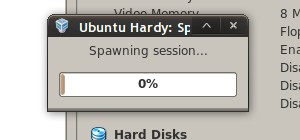
Open a terminal. If you haven’t already forced VirtualBox to quit, kill it:
killall VirtualBox
Run this command to automatically recompile and start the VirtualBox kernel module:
sudo /etc/init.d/vboxdrv setup
After a few seconds you should have some output like this:
 * Stopping VirtualBox kernel module                                             *  done.
 * Recompiling VirtualBox kernel module                                          *  done.
 * Starting VirtualBox kernel module                                             *  done.
That’s it; restart VirtualBox and start your virtual machine. You may need to repeat this process the next time there is a major kernel update in Ubuntu.
Archived Comments
Vadim P.
Yes, that fix worked for me
Tony
Excellent post! You fixed my problem before I even realized I needed it :-)
Anonymous
Worked like a charm!
GreySim
The good news is that DKMS is supposed to fix this in Intrepid. I foolishly run Intrepid as my main system and I use Virtual Box 2 from the Ubuntu repos, and every time I get a kernel update it automatically updates the VBox modules. I haven’t had any problems with spawning sessions, and I know I’ve had at least two kernel updates since installing VBox.
Jonathan
Having to repeat this process with future kernel upgrades can be prevented by installing the dkms package in Synaptic.
See posts by frank and me (jblackhall):
http://www.virtualbox.org/ticket/2421
Ramesh
Man u read my mind.. I have updated 2.6.24-21 from 2.6.24.19. Major issue is that my Cisco Vpn no longer works. then I thought of starting Virtual Box then connect VPN through xp. it has right there on swapping session.. No luck and clue from googling. Then switched back to 2.6.24.19. VPN and virtual Box are happy.
Any clues on VPN . I did have patch and reinstalled ( compiled with latest kernel )
will there be an issue once u compile VirBox with 2.6.24.21 and going back to 2.6.24.19
I am regular reader of you blog.. I really enjoy it .. Keep up the good work.
Cheers
Ramesh
LaPeGa
I fix it doing this:
$ sudo dpkg-reconfigure virtualbox-2.0
dmitry
It works!
Thank you! Accurately and useful …
Anonymous
Thanks!!!!
Max
Thanks for the tip. Worked perfectly.
Anonymous
Thank you! This worked perfectly. My machine took 20-30 seconds to recompile the kernel.
Anonymous
Thanks for the fix. This was driving me nuts. :)
TheBinary
Thank you! It worked perfect! Nice!
Hugh
This is why I like this blog so much. The posts are always so topical! No point searching Google anymore for problems. Just wait for Tombuntu to post a fix! ;-)
Cosmin
thank you,
I had this problem and your solution worked ;)
Nelson Delgado
Ran into the problem after yesterdays kernel upgrade…
Works like a charm! thanks!
ischnura
Just in time!
I was having this same problem.
Thanks for the info it helped a lot :)
Pete
Nice one. Simple fix to a frustrating problem post a major set of 8.04 updates.
Cheers
Anonymous
I had no idea this problem was caused by the kernel update. It now works. Thank you!!
Ollie
Thanks for the post. Worked perfectly.
cefleet
Hey thanks your a lifesaver. MY work depends on Vbox and i saw this this morning and was about to prepare myself for a long day, but thanks to you my day has gotten a little better.
Alex
Thank you very much Tom !!!
Anonymous
thx
Owdy
Thanks, that worked in openSUSE 11.1 too!
TheEmulator
Gracias
Era lo que buscaba :)
Anonymous
Man, can play my Rhapsody again. I appreciate your input and effort
mindjuju
thx!
Anonymous
Worked for me too. Thank you!
Anonymous
thank you very verymuch.
Henry
I doesn’t work for me. I got an error:
Cannot change owner vboxusers for device /dev/vboxdrv
-———————
* Stopping VirtualBox kernel module * done.
* Removing old VirtualBox kernel module * done.
* Recompiling VirtualBox kernel module * done.
* Starting VirtualBox kernel module
* Cannot change owner vboxusers for device /dev/vboxdrv
Tom
Henry:
Maybe the permissions on /dev/vboxdrv have been messed up. I’d try something
like this to change the owner to root and the group to vboxusers (how it is on
my system):
sudo chown root:vboxusers /dev/vboxdrv
fishears
THANK YOU FOR THIS FIX.
I knew you had to re-configure vmware for new kernels but I didn’t know this
applied to vbox as well. Shame on them for not putting a useful message on
screen when this happens…
Still… it IS free, isn’t it, so what the hey?!
PhoenixP3K
So glad I came across that tip! Simple, direct and effective. Just the way I like them!
Jesper
The reason why this happens is because you got a kernel update. If you install a new kernel, you must have new kernel modules, including a new kernel module for VirtualBox.
The fix described here rebuilds the VirtualBox kernel module for the new kernel.
Note that you don’t get a new VirtualBox kernel module automatically, because you installed VirtualBox from a *.deb package yourself, and not from the Ubuntu repository.
TioLucas
Desde Argentina
Muchas gracias amigo, It works!
khelll
It worked perfectly,Thanks alot!
John John
Many Thanks from Greece for that!!!!
You are great!!!
qbl
thanks a lot. you saved my day!
Anonymous
Excellent tip, thanks so much for posting! I installed VBox from *.deb for the USB support, and forgot completely that I needed to add kernel modules. And it was the first match that google found when searching for the error message. Very handy!
lu
It worked fine for my Ubuntu 8.04 2.6.24-22-generic
Linux kernel. There is a method to install VirtualBox
so that this (good) workaround is no more necessary ?
Thank You and Best regards.
Anonymous
It works!Thanks
dimeotane
Thank you for your post! I had work to do immediately in virtualbox, but I had no idea how to fix it. Thank goodness I had access to wireless to google for the solution.
Anonymous
didnt work for me. just said [FAILED] check /var/installlog but there’s no such file…
ibharahty
this solved my problem..!! under intrepid.. Linux Rocks..
Raj
What else can I say , this is the first time on the internet I found a solution for the problem in just then 2 min ..
Google search
tombuntu site , and the fix worked like a charm
Great work !!!!!
Thomas
Got a few “bad conf file” errors but it worked through it anyway and problem solved.
Thanks so much.
chen_767
i solved the problem just by restarting my computer
Exsecrabilus
Wow. What a coincidence. I just tried VirtualBox yesterday and and had that problem. I forgot about it, and come here, and here’s the solution! :)