
Setting Up a Bluetooth Mouse
I purchased a Logitech V470 Bluetooth mouse for use with a laptop with an internal Bluetooth radio. Setting up Bluetooth input devices in Ubuntu 8.04 is easy (there’s no command line or config files), but not entirely straightforward.
Where I got confused initially was using the Browse Device option to pair the
mouse. This seems to be meant for file transfers only and causes the mouse to
disconnect and reconnect rapidly. Here’s the correct way to set this up:
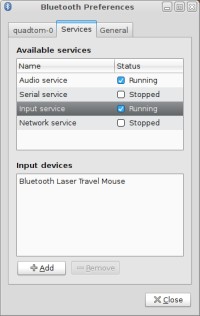
If your system’s Bluetooth radio is working, you should have a Bluetooth icon in
your notification area. Right click on this icon and select Preferences.
Select the Services tab, and turn on Input service if it is not already
running. Select the Input service item from the list and click the Add
button.
A new window will list all the currently visible input devices. If your mouse
isn’t visible here, then press the button that makes the mouse discoverable now.
(For the Logitech V470, that’s the Connect button on the bottom of the mouse.)
Select the device and click Connect.
The new mouse should start working immediately. In my testing, the mouse will also automatically reconnect after a reboot.
[update] In Ubuntu 8.10, the Bluetooth utility is much easier to use. To
add a new device, left click on the Bluetooth icon in the notification area,
select Setup new device, and follow the directions.
Archived Comments
Mouth
Had my V470 paired to Ubuntu with internal BT for a few months now. It’s a terrific mouse - you’ll love it!
David
Well i have a dongle bluethooth when it’s plugged in usb it works (after making some adjust (similar to what is explained here) but when the system is reboot it blocks the internet, i mean that the nm applet can’t get an ip adress until the dongle is unplugged and reboot is performed
serek
Thanks a lot. Useful help!
obelmepsimbip
Hello! simply super resource
Obama+Me=Change
Its great advice but my Ubuntu doesnt seem to be able to see it. what do you think?
mustafa
I use ubuntu 9.10 and when I click preferences I do not see services tab
What can I do
ibokozan
hello i have a4tech bt-630 bluetooth mouse and 11.10 ubuntu. after i read your article about bt mouse on 08.04 i touhgt i wish have it.
my mouse is not working properly. it should sleep after 5 min. doesnt work.
after reboot, does not connect automatically.
even paired cursor is not moving but it says connected ! please help
Kevin
I have the Logitech V470 Bluetooth mouse as well. All the basic features are working for me (in Ubuntu 12.10) but I can only mess with the speed and acceleration of the mouse in the mouse settings. I’d like to be able to tell the computer that I want it to go back and forward a page by tilting the scroll wheel to the left and right, respectively. I’d also like the computer to go into “scroll mode” when I press the scroll wheel down. Lastly, I’d like the computer to open a new tab in the browser when I press down the scroll wheel over a link. How might I do these things on Ubuntu 12.10?
Matt
Related fact: I recently started using a Logitech wireless mouse with its own non-Bluetooth adapter. All I had to do was plug it in and it worked (with Ubuntu). A notification pops up when the battery level gets low. It couldn’t be any simpler or easier! :)