
Hamster Time Tracking for GNOME
Hamster is a time tracking tool that runs as a GNOME panel applet. With Hamster, you can track what you’re doing, when you’re doing it, and for how long easily and right from your panel.
Hamster will be included in GNOME version 2.24, and likely also in Ubuntu 8.10.
Open System->Administration->Software Sources. Select the Third-Party
Software tab. Click Add, and paste in this repository:
deb http://ppa.launchpad.net/hamster.support/ubuntu hardy main
Close Software Sources, and when prompted, choose to reload the repositories.
Install Hamster from the package hamster-applet (click the link to install), or by running the command below in your terminal:
sudo apt-get install hamster-applet
Add Hamster to your GNOME panel to begin using it. Right click on an empty area
on a panel and select Add to Panel. Select Hamster from the list and click
Add.
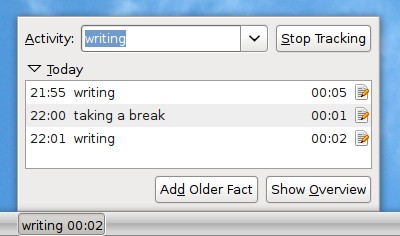
After you’ve added Hamster to your panel, you’ll see “No activity”. Click on the text to bring up Hamster’s activity interface.
Simply type what you’re doing into the Activity text box and press Enter to
begin tracking it. You’ll see the text on the panel change to your current
activity and how long you’ve been doing it. When you’re finished, either click
Stop Tracking or type a new activity. One useful shortcut is to double click
on an item in the Today list to start tracking that activity again.
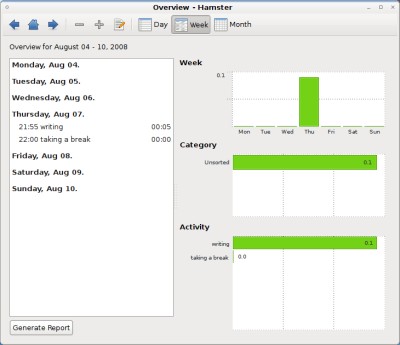
The Show Overview button opens a more advanced interface for editing and
analyzing past activities. Clicking the Generate Report button will create an
HTML summary of your day and open it in a web browser.
Archived Comments
Anonymous
does this work in kde too? (freedesktop.org?)
Konqi
no but use KTimeTracker
Steven
You beat me to the punch! I was planning on writing about Hamster this evening :) I may well still write something, we shall see. Great app, great article.
Time Tracking
Simple to use, light footprint, attractive interface…what’s not to like? Great writeup with a plethora of information!
Mohan
Awesome software, this will come in handy for me with my web development and of course school work. ;)
dave
Nice app.
Thanks.
Anonymous
Time tracking tools must be automatic. Having to manually start and stop the counter for each task mostly defeats the purpose of the app. It would be much more interesting if it told me how much I spent on browsing, email, etc. without my intervention
Jaime Iniesta
Looks good. Until now I’ve been using gtimelog but hamster seems more complete. I like the graphs.
Anonymous
gtt – Gnome time tracker?
http://gttr.sourceforge.net/
Xobb
I was looking for a such nice tool for a long time!
Thank you
Tomasz Mazur
Awesome. Simple, and makes all that I was looking for!
THX
Mark Stosberg
This looks OK, but doesn’t look quite done yet. I’m using fresh packages fro Hardy, and I see a few quirks: There’s no way to delete projects or activities, although you can make the name of this titles contain no characters. Also, when I adjusted an entry to start 4 minutes ahead of the current moment, it recorded that I had worked 23 hours and 56 minutes on the task today, which was of course wrong.
There’s no desktop time tracker for Linux that I really like now. I use Gtimer, which has long since been abandoned by the author.
brij
for KDE:
KArm tracks time spent on various tasks. It is useful for tracking billable hours and can report the hours logged by task and day.
M. Emad Hegab
I Loved The Project that i created an extension for chrome inspired by it :)
https://chrome.google.com/extensions/detail/cegaadncabdacaplfeondbaodibgjfhi?hl=en
have fun and feel free to test it and give me the feed back
Vadim P.
That’s pretty nice. It’s similar to RescueTime, but is actually a lot easier to install (no .debs or PPAs for rescuetime)