
Updating CheckGmail to Fix Login Errors
A few months ago I wrote about a feature-rich open source application for monitoring your Gmail inbox - CheckGmail.
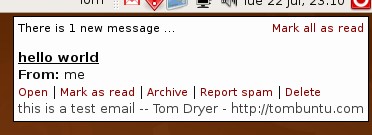
I know a few of you, like me, have been continuing to use it since.
Unfortunately, a few days ago CheckGmail stopped working with a Error:
Incorrect username or password dialog. I’ve found a solution for this. Skip
down this post if you’ve already installed CheckGmail.
Installing CheckGmail in Ubuntu 8.04
Install CheckGmail from the package checkgmail (click the link to install), or by running the command below in your terminal:
sudo apt-get install checkgmail
CheckGmail has an optional dependency that adds password encryption. Install the package libcrypt-simple-perl (click the link to install) or by running the command below in your terminal:
sudo apt-get install libcrypt-simple-perl
Start CheckGmail for the first time from Applications->Internet->CheckGmail.
You can get started by entering your Gmail credentials and clicking OK. Note
that unless you installed the optional dependency, using the password saving
option will store your Gmail password on your disk in plain text. The CheckGmail
icon will appear in your notification area.
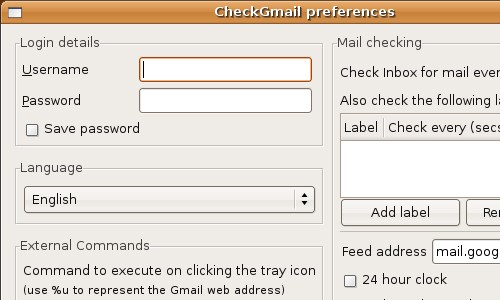
You can start CheckGmail automatically when you log in. Open
System->Preferences->Sessions and click Add. In the Add Startup Program
dialog, set the name value to CheckGmail and the command to checkgmail.
CheckGmail fails to log in - three options for fixing the authentication bug
The quick fix is to run CheckGmail with the
-no_cookiescommand line option. The downside is that you lose some functionality (actions such as mark as spam and archive). You’ll need to update your startup or menu item to start CheckGmail using this option.checkgmail -no_cookiesThe latest development version of CheckGmail includes a real fix. The CheckGmail developer wisely included an update feature for just a case like this. Simply open a terminal and run:
checkgmail -updateHowever, SourceForge.net has been having performance issues lately and has disabled their ViewVC interface which is required for the CheckGmail update function to work. In the meantime, here’s another alternative.
To work around SourceForge.net’s issue, you’ll need to use subversion to download the latest CheckGmail version.
Install subversion from the package subversion (click the link to install), or by running the command below in your terminal:
sudo apt-get install subversionRun the command below in a terminal (it’s one line) to use subversion to download the latest version of CheckGmail:
svn co https://checkgmail.svn.sourceforge.net/svnroot/checkgmail checkgmailRun these to commands to copy the new version over the old one and clean up (you may be asked to confirm deletion of some write-protected files):
sudo cp checkgmail/checkgmail /usr/bin
rm -r checkgmail
Run CheckGmail normally and it should log in successfully.
Archived Comments
Anonymous
awesome! thanks. that was driving me crazy.
Garry
I don’t know much about computers but I followed your procedure step-by-step and it solved the problem. Thank you for taking the time to post this solution. People like me rely on people like you to keep our computing lives on track
iampriteshdesai
Tom you are amazing. I was having the same problem and I was so pissed by it. Thanx!!! You rock. Are you Indian?
iampriteshdesai@gmail.com
Martin
Thx a lot! It works now
Jelena
Thanks a lot for this detailed and so articulate post!
Really glad to have found it among the piles of confusing
Ubuntu-beginner-unfriendly forum tips:)
It was an instant help!
Sincerely,
Jelena from Croatia
PaceyIV
checkgmail 25.7 MiB
gmail-notify 64.0 KiB
Why should I use checkgmail????
Anonymous
ya beauty!
Litrik De Roy
Everything works again. Thanks.
Anonymous
It appears that svn access alltogether is broken (7/30/08). Anyone have a mirror?
Anonymous
Hi, I am using cgmail, which is more flexible as it supports GMail, but also POP3 and IMAP Mailboxes.
NZJon
Hi Tom,
Many thanks for sharing this–certainly fixed my problems with CheckGmail!
Cheers,
Jon
Max
Thanks for this post. Using the -no_cookies solved the problem for me. Here is what I don’t understand: CheckGMail was working fine until about one week ago. Then the problem you describe here happened. However, your post is dated from July 2008, and back then until now, it was working fine for me. What made it suddenly stop working for me, more than a year after you?
-- Mystified Max
Hooty
Thanks, the no_cookies switch did the trick for me.
wolfgreen
Slick! May i suggest that you incorporate this update in the official release. Or if you have, kick the ubuntu team in the donkey, for being slack in a nonzen way.
nightman
Damn, this is exactly what Ive needed :) Thank You!