
Enable the Advanced File Permissions Dialog in Nautilus
Yesterday I wrote about PCMan File Manager, which among other things offers better control over file permissions.
Commenter Gavintlgold pointed out that’s it’s possible to get a similar dialog
in Nautilus by changing a hidden setting in GNOME. You can find this setting in
gconf-editor under /apps/nautilus/preferences with the name
show_advanced_permissions. Alternatively, run this command to enable the
advanced
permissions:
gconftool-2 --type bool --set /apps/nautilus/preferences/show_advanced_permissions True
Switch back to the normal dialog with this command:
gconftool-2 --type bool --set /apps/nautilus/preferences/show_advanced_permissions False
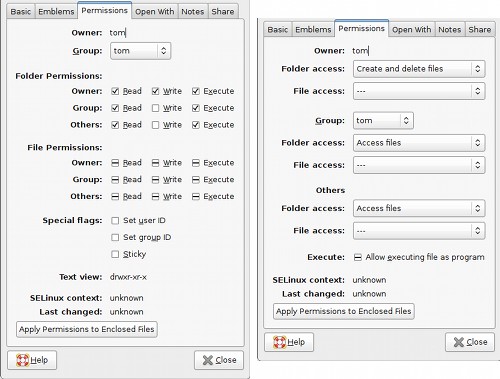
The dialog on the left is the advanced one, if you’re familiar with file permissions you may prefer it. The right is the default setting, which uses drop down boxes instead of check boxes.
Archived Comments
Ryan Henningsen
I already have it configured for the advanced setup.I’m running 64-bit Hardy Heron 8.04… Perhaps I changed it along time ago…
cdup
Ubuntu Tweak (http://ubuntu-tweak.com/) has an option that lets you enable/disable this feature easily from a GUI.
By the way, while it’s called Ubuntu Tweak it actually tweaks Gnome and will apparently will be available other linux soon. (http://ubuntu-tweak.com/2008/04/08/tweak-03-preview.html)
Dr Small
This was one of the things that really annoyed me when I moved from Dapper to Feisty. I absolutely HATED it. But now I am on Arch and simply use PcManFM anyhow :D
Bradlee
Great post! There is so much available in gconf, it’s too bad that many gnome programs are so intentionally bad at exposing these options. Can’t there be a happy medium between gnome’s philosophy and KDE’s?
Thanks for the great work you do.
Brad Edmondson
SilverWave
Cheers that was just what I needed.
You may want these as well:
1. Install nautilus-open-terminal
2. Install nautilus-gksu
3. From nautilus > preferences > Add a Delete Command.
john
Thanks, Searched the net for a tool, Accidentily came to know this
Vadim P.
Thanks so much! I didn’t want to install a different file manager, and was waiting on nautilus to get some of the fancy things. This is one of them.