
Enable Commercial DVD Playback in Ubuntu
Update: See the updated instructions for recent Ubuntu releases.
Like Adobe Flash and proprietary media formats, playback of encrypted DVDs is something that Ubuntu can’t distribute in the default desktop. Adding support for playing your commercial DVD videos in Ubuntu isn’t a difficult task.
There’s a script included in Ubuntu that can install software for decrypting DVDs, run it by pasting the line below into your terminal:
sudo /usr/share/doc/libdvdread3/install-css.sh
If all went well, that script should have downloaded and installed the
libdvdcss2 package for you.
Whenever you insert a DVD, the Totem Movie Player should launch and begin playing the disk. Unfortunately, Totem makes a really poor DVD player as it does not support DVD menus. It’s possible to install a different back-end for Totem to play DVD menus, but I just like to use the VLC media player instead. I’ve found that VLC does a fantastic job with DVDs.
Install VLC from the package vlc (click the link to install), or by running the command below in your terminal:
sudo apt-get install vlc
Open VLC from Applications->Sound & Video->VLC media player. To play a DVD,
click File->Open Disk.
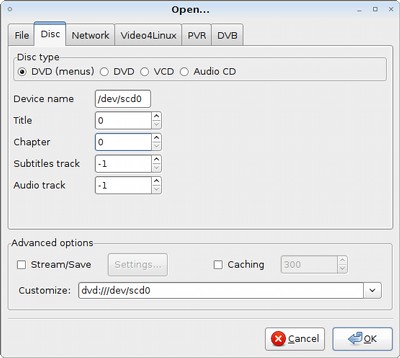
There’s a lot of options in this dialog, just make sure the disk type is set to
DVD (menus), click OK, and the movie should begin to play.
Archived Comments
Mrrix32
Thank you! DVD playback was one of the few reasons I boot XP up!
Júnior
Or use medibuntu:
https://help.ubuntu.com/community/Medibuntu
;)
wally
After running sudo /usr/share/doc/libdvdread3/install-css.sh in Hardy I got that message from terminal.
No prebuilt binary available. Will try to build and install it. You need to have debhelper and fakeroot installed. If not, interrupt now, install them and rerun this script.
This is higly experimental, look out for what happens below. If you want to stop, interrupt now (control-c), else press return to proceed
What on earth is that about? It certainly gave me the willies so I gave up. Is it something I should be scared off?
PhantomLORD
There is a way to use VLC as Default DVD player in Ubuntu Hardy. Yes.
You go in control center and (dont know exactly now, is it in “programs” or in “removable drives” and for autoplay for dvd´s put there command (vlc dvd://)
PhantomLORD
A dont know, but think that you need liddvdcss2 to play dvd´s, or am i wrong, whats the diference between css and css2
http://packages.medibuntu.org/pool/free/libd/libdvdcss/libdvdcss2_1.2.9-2medibuntu4_i386.deb
mads
I sometimes wonder at all the guides and tutorials and hair-pulling people are doing to get multimedia on linx when there is VLC. It does my DVDs, my video files, streaming radio/video, stream saving, and transcoding, it’s the best and simplest way to record/watch webcam video, it can even be run as a daemon, it’s 100% command line configurable, and all of it in one consistent package. Desert island software, definitely :D
Chris
The problem with Medibuntu that I personally found is that I couldn’t get the DVD menus to work. The DVD video of the main movie would playback, and that’s it.
This script probably solves all your issues. Next time I do a clean install of Ubuntu, I’ll try this method instead, thanks
Bill Goldberg
Could someone explain the difference between libdvdcss2 and libdvdread3
From what I know, libdvdcss is created by vlc and libdvdread by Ogle.
Anyway, I just installed libdvdcss and dvd’s played in totem.
But just downloading vlc from the medibuntu repo should give you dvd playback.
Downloading vlc from the standard ubuntu repo’s won’t give you dvd playblack.
Tom
wally:
That message means the script couldn’t find a pre-built package for your CPU
architecture. It’s probably fine to let it go and try to build you a package
from source.
PhantomLORD:
You do need libdvdcss2, it gets installed by the script.
Bill Goldberg:
libdvdread3 is a library that lets many applications easily read from video
DVDs. libdvdcss2 is the library used by libdvdread3 to decrypt commercial DVDs.
You need both to play commercial DVDs.
PhantomLORD
But didnt you say that it installs libdvdcss (1) and libdvdcss2 is not the same, i think, or are?
Didnt “ubuntu restricted extrass” installs libdvdread3? If so, did it install also and libdvdcss2 (i believe not)?
And from where this script installs libdvdcss2 (medibuntu maybe), because in repository is listed but says “package not available”?
Mohan
Nice, but I have problem with my Hardy installation on my laptop. Whenever I run the DVD ROM, the touchpad is unusable I have plug in a USB mouse. This wasn’t an issue in Gutsy. Any suggestions?
Tom
PhantomLORD:
The script installs libdvdcss2 (updated the post about this). I think it’s just
a newer version. The ubuntu-restricted-extras package does install libdvdread3,
but not libdvdcss2 for legal reasons. The script downloads from this site:
http://www.dtek.chalmers.se/groups/dvd/deb/
Mohan:
I’ve never heard of any problems like that, you should think about filing a bug
report.
Bill Goldberg
Thanks for clarifying.
I found it strange that I never had to install it.
But I turns out the package is in the restricted extras package.
Which I always install the second after I install ubuntu.
Anonymous
Try this to make vlc player dvds when inserted
Code:
gconftool-2 –type string –set /desktop/gnome/volume_manager/autoplay_dvd_command “vlc dvd://”
eagledrc
I can play dvds, but I don’t get sound on VLC. I can get sound on all other
media players, but can’t properly play dvds (with menus) on those. How can I get
sound on vlc? I don’t get it for music either…
Please email me at eagledrc[at]yahoo.com
or AIM/Yahoo/Google chat: eagledrc
or respond here if you can help, please!
Anthony
Here is a tutorial with an automated script for all versions of Ubuntu: http://www.hildoersystems.com/index.php/home/62
Anthony Hildoer
Just use this, it works every time for all versions of Ubuntu:
Enabled DVD Playback in Ubuntu in ONE Command
http://www.hildoersystems.com/index.php?option=com_content&view=article&id=62:enable-dvd-playback-in-ubuntu-in-one-command&catid=39:multimedia&Itemid=59
Frink
iam getting
Your input can’t be opened:
VLC is unable to open the MRL ‘v4l2://’. Check the log for details.
what iam i doing wrong… P.s iam noob so type slowly so i understand
Wayn
I love this post.It’s so cool.
Me
Hi
Anybody knows what happens below, please?
I try to play a dvd in 9.10 that worked fine on 9.04 and I get this:
***********************************
Playback failure:
VLC cannot set the DVD’s title. It possibly cannot decrypt the entire disc.
Your input can’t be opened:
VLC is unable to open the MRL ‘dvd:///dev/sr0’. Check the log for details.
***********************************
Where is the log file?
eszter
thank you thank you thank you! i’ve been working on my dvd -vlc problem for days, and you gave me the solution! i installed and reinstalled 5 times the ccs, vlc, the works, but the solution was much simpler! thank you!
Serpa
Nice hint.
There is a way to use VLC as Default DVD player in Ubuntu Hardy?