
Play YouTube Videos from the Totem Movie Player
GNOME’s Totem Movie Player now includes a plugin for searching and playing YouTube videos without leaving the player, and without Flash. It’s installed by default in Ubuntu 8.04, and works fabulously!
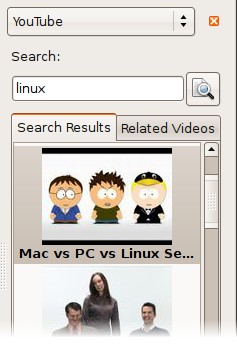
The YouTube plugin needs to be activated before you can use it. In Totem’s
Edit menu, select Plugins to open the Configure Plugins dialog. Here,
enable the YouTube plugin. Close the dialog.
The YouTube browser runs in Totem’s sidebar. If the sidebar isn’t open, enable
it by selecting View->Sidebar. Click the sidebar’s drop-down box to select the
YouTube view.
Unfortunately, It takes a minute for the plugin to load search results, but this may be an issue with YouTube’s API and not the plugin. However, I’ve found that videos buffer and begin playing almost instantly.
Two features I’d like to see are a download button which encodes the current YouTube video to a convenient format and saves it, as well as an option to use the higher-quality H.264 video that YouTube offers.
There’s a modification to this plugin that will play the H.264 video, you can install its package from this page and enable the YouTube H264 plugin the same way. On recently added videos, the H.264 file looks much better.
Archived Comments
gooz
Wow, that’s wonderful :)
Thanks!
Rune Svendsen
In the “Configure Plugins” dialog I can only choose between three plugins and not a YouTube plugin..
youtube
thanks.perfect topic.:
Geoserv
STUMBLED!
Very cool. Thanks for sharing.
VOTED for this post at:
http://www.newsdots.com/software/play-youtube-videos-from-the-totem-movie-player-tombuntu/
Anonymous
You’ll need the “gstreamer0.10-plugins-bad” package for this to work, and that’s NOT installed by default in hardy heron.
Anonymous
For me, installing the “gnash” packet helped.
kkathman
Tried this, and installed the gstreamer plugin, plus codecs and the quality was horrendous. Even the Totem page remarks that there are bugs and its using an outdated package. Not really very good output at all.
zmjjmz
Hm, when I do this nothing happens.
Checked the terminal output, and it turns out totem, for some inexplicable
reason, can’t load any thumbnails.
Anyone else having this problem?
Anonymous
An error occoured ffdemux_swf: Element doesn’t implement handling of this
stream. Please file a bug.
Please help
Noma Nescio
Anonymous said, in October 31st, 2008 at 11:53 pm
An error occoured ffdemux_swf: Element doesn’t implement handling of this
stream. Please file a bug.
Please help
Also: http://tennessee.ubuntuforums.com/showthread.php?t=971652
Same here! PLEASE HELP!
Locke
sudo apt-get install gstreamer0.10-plugins-ugly
That will prevent ffdemux_swf error.
siva
you get probs if youtube had any maintence or they doing chnages in their code, they offen do tat evevry 3 to 6 months normmaly
k
Works great, but I wish you could enter a youtube address to “open a file”, also would be great if you could do this from the command line so that it would work with mediaplayerconnectivity
don
hello everybody,
I have a problem when trying to play youtube or bbc from totem.
I first have the dialog box “Could not open location; you might not have
permission to open the file.”
then on the terminal I have this message: “** Message: Error:
“http://www.youtube.com/get_video?video_id=WN3GfdROhkg&t=vjVQa1PpcFMCmEiqSTIGnbBfwAawNPaGj5ywiMRb96A%3D&fmt=18”:
Not Found
gstsouphttpsrc.c(1096): gst_soup_http_src_parse_status ():
/GstPlayBin2:play/GstURIDecodeBin:uridecodebin5/GstSoupHTTPSrc:source:
404 Not Found”
can you help me please?
mike
Thanks so much, this is wonderful, it hasn’t ceased to amaze me how fantastic linux/ubuntu and associated software is…
kwame
mine loads up and plays instantly.i do not have to wait for search results or for it to buffer to play