
Enable Metacity Compositing in GNOME 2.22
In GNOME 2.22, included in Ubuntu 8.04, the default Metacity window manager has compositing built in. This means that you can get your eye candy effects without switching window managers!
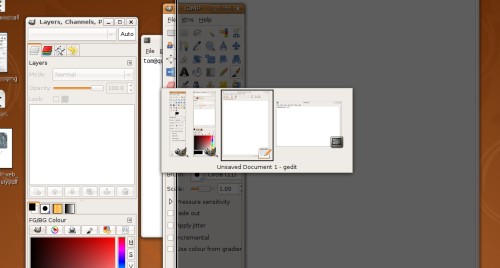
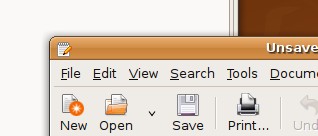
Metacity won’t give 3D effects on the same level as Compiz, but it’s much faster and less resource-intensive. The main advantage of using Metacity’s compositing is that you can run applications such as Screenlets, Awn, and GNOME Do that would otherwise need Compiz for their eye-candy. In addition, you get shadows, max/minimize animations, and shaded Alt-Tab effects.
Alt-Tab with shaded windows:
Window shadows:
You’ll still need accelerated graphics, as well as GNOME 2.22 (Ubuntu
8.04) to use Metacity’s compositing. In previous versions of GNOME, the
compositing was not compiled in by default.
[update] You don’t need accelerated graphics to run Metacity with compositing. It even works well inside VirtualBox! If your computer can’t run Compiz, give this a try.
Metacity compositing is still being tested, so their’s no simple interface for turning it on. You can enable it through the GNOME Configuration Editor, or using the terminal.
Open the GNOME Configuration Editor; press Alt-F2 to open the Run Application
dialog and type gconf-editor. Click Run. Navigate to
Apps->metacity->general. Check the compositing_manager box, and Metacity
will immediately restart with compositing!
If you’d rather just run a quick terminal command, run this to enable compositing:
gconftool-2 -s '/apps/metacity/general/compositing_manager' --type bool true
And this command to disable it:
gconftool-2 -s '/apps/metacity/general/compositing_manager' --type bool false
I’ve been running Metacity with compositing for a few days instead of Compiz. I haven’t had any problems. How’s it working for you?
Archived Comments
Christoph
Don’t forget to disable the compiz effects, when you want compiz again. Currently there’s a nasty bug out there which prevents compiz from starting when metacity’s compositor is enabled…
darthanubis
I turned it on. I have compiz running as well. So it had to tell whats doing what. That being said, I still think its cool!
Ketil
Screenlets has not needed compositing since many months.
giz404
Didn’t work very good for me. Metacity was very cpu-hungry, when Compiz runs just fine.
Anonymous
After enabling it the animations were slow and jerky, whereas they are much faster in Compiz. I’ll be sticking with Compiz for now. I enjoy the fact, though, that everyone is jumping on the compositing bandwagon (now that KDE and Gnome both have their own compositing using their default window managers). This could get quite interesting because of that.
Sdm
I compiled the new metacity to use with Gutsy and I like the result so far.
It’ll be even better if the rgba support is officially released like the new Murrine engine that currently is still developed.
ell
im not running this in an accelerated video, there are some flickering but tolerable imo :)
Chonnawonga
I’m also finding Metacity compositing a bit on the slow-and-jerky side. That said, it hasn’t been crashing for me like Compiz has. (I’ve been getting very frustrating hard lock-ups with Compiz.)
wyth
Slow and jerky for me, too. I run Compiz with a minimum of features, and have all the settings to run pretty quickly. With those tweaks, Compiz flies, and Metacity couldn’t keep up. Didn’t notice any significant difference in cpu usage.
Chris Lees
Great! Now my friend can get eye candy even though their new computer uses ATI graphics!
Henrique
The “jerkyness” is caused by a hardcoded limit of 50FPS, lower than most diplays, that start from 60hz. Make sure you are running the latest source from trunk, this limit has been removed some days ago.
Anonymous
Guessing it relies on XRender ? Not very fast for people with AMD/ATI cards + fglrx, in other words (fglrx’ XRender-acceleration is right next to nothing, event the newest Catalyst 8.4).
Vexorian
It is much better than compiz, that is for a guy that doesn’t really like all those things that seem to just hurt performance and compatibility, so metacity does it in the least painful way, which is good, I have noticed some graphic glitches, specially when opening the menus sometimes it would first show some black block with some colored lines for half a second, else it is great.
Michel S.
Tried the new compositor a while back, and can’t remember why I stopped using it. After trying out Xfwm’s compositing (and finding that it works well – until I tried browsing Youtube), it’s a pleasant surprise to find a stable, no-frills compositing.
Oh, and GNOME automatically uses translucency for the volume change pop-up notification. Gorgeous!
aaz
that’s horrible, too big !
Anonymous
Yeah, really nice, but is there any way to manipulate the effects, too, or can you just actvate/deactivate compositing in gconf-editor?
Anonymous
Hmm….that’s weird. I have it enabled, but nothing seems to have changed. Don’t get any nice effects…
Anonymous
I have an i915 graphics accelerator. In order to use compiz I need to disable DRI. This option is nice as I can now have compositing windows and DRI in gnome.
Ise
I don’t have graphic acceleration, enabled metacity compositing. Effects like shadows and windows animation are cool, even AWN worked well, but in my desktop was just the wallpaper. Any icon for usb memory, CD or program disappeared. I couldn’t change the wallpaper using mouse right-button, it’s unresponsive. When system starts, there is a grey layer that disappears as new windows cover the screen.
thierrybo
As far as I know, various sources states that Gnome compositing use GPU as Compiz and other states thats effects are handled by CPU.
Is there an official source for this ?
Anonymous
Found this on a last-ditch Google search. I loved Gnome Do when a friend showed
it to me, but my poor machine couldn’t handle all the baggage Compiz adds into
the mix.
This is a wonderful find for me. Glad my random idea is a reality.
cloakable
Now all that’s needed is a nice checkbox to switch it on, not some obscure registry entry.
nelas
Alt+tab is extremely slow for me with composite enable… :-( Probably because it is generating thumbnails.
Is there a way to tweak this?
alex g
Quite slow for me also, compiz runs faster. I have an old ati radeon 9600, with latest driver installed(usind debian squeeze). I need a nvidia card, because ive had only problem with the ati card.
Aruna
I followed the steps. But when I logout and login again matacity not starting. I have to start manually “visual effects” in System->Preference->Appearance. I’ve installed compiz in the system. Should I uninstall it?
Max
Thanks a lot for this article! :-) Actually I do not only like this article, but your whole blog. I guess you’ve just found a new regular reader…
On my machine Metacity compositing seems to run quite well. Now I finally can use Gnome Do without Compiz. Only Google Earth still is behaving strangely… probably a general compositing problem with Google Earth…
lhenry
I use compiz just to use the negative plugin .. i wish to do the same thing on metacity but cant find any resource to accomplish …
mikhailov
This one bring me back to using of Gnome-do on dualscreen with intel 950 video card. Indeed, compiz should be disabled
molecule-eye
Alt+tab is also slow for me, and I don’t get shaded windows either, just window outlines. Lame, and going back to speedier compiz.
Arm
Hello, tnks, is very usefull
phatkars
My Ubuntu 8.04 system lost the minimize and maximize icons on the windows, forcing me to use metacity. It seems like something broke in a recent upgrade. Has anybody else experienced this problem?
anonymous
This feature is great and it runs good for me on Debian.
I like this much more than Compiz because Compiz is too much exaggerated for
normal desktop users like me.
Thanks for this more than useful hint!
lantern light
never ending innovation with a big team and a free license, great!
Tshann
Works! thanks for the tip!
RavanH
I am pleasantly surprised to find this is still valid on Gnome/Metacity 2.30… Now I’m able to have some decent drop-shadows and transparency without that hungry beast Compiz!
Thanks :)
Daniel Andersson
Works great in Debian 6 Squeeze!
camiliox
I had some problems with the menus of blender 2.5, but otherwise everything works fine (including the console transparent) translated with google translate sorry for my bad English.
Scott Wegner
I’ve also been using Metacity on Hardy, and am very happy to be able to use the default Windows themes with effects.
However, I have noticed that on occasion, the title-bar buttons will get a little bit jumbled. This seems to happen a lot in Firefox, probably having to do with the frequency of title changes when switching tabs.