
Custom Compiz Effects in Ubuntu 8.04
Installed CompizConfig Settings Manager and are wondering where the custom visual effects setting has gone? The way this works has changed in Ubuntu 8.04.
In order to manually configure Compiz, you need to enable the Custom setting
in Appearance Preferences. In Ubuntu 7.10, this was done by installing
CompizConfig Settings Manager. A new tool, called Simple Compiz Config Settings
Manager now needs to be installed to enable the option. Whether or not you want
the Simple CCSM, you need to install it to enable the custom effects level.
Install Simple Compiz Config Settings Manager:
sudo apt-get install simple-ccsm
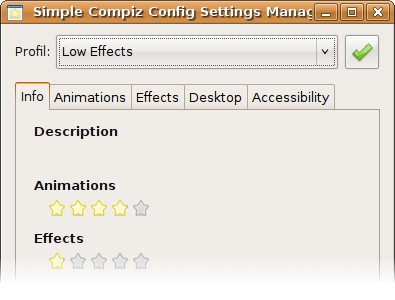
Now you can switch to custom effects. Click the Preferences button in
Appearance Preferences to open the simple configuration tool. Simple CCSM is
nice, but to access all the options you need the full CCSM.
Install CompizConfig Settings Manager:
sudo apt-get install compizconfig-settings-manager
You can run CCSM from the System->Preferences->Advanced Desktop Effects
Settings menu item. Note that to use Simple CCSM or CCSM, you need to have the
Custom effects option selected.
Archived Comments
Noumaan
For some unknown reasons compiz didn’t work with Feisty and I was very pleased to find out that it worked with 8.04 hardy beta by default. Since I was not very familiar with keyboard shortcuts and I wanted to try all these effects so I installed CompizConfig Settings Manager.
Anonymous
do you have to have x-server installed for this to work?
edy
The minimize animation doesn’t work with ccsm
luke
The minimize, shade, and focus animation don’t work for me in heron either for some reason.
Anonymous
an error comes up when i try to open the compizeconfig setting manager
Anonymous
It seems as if minimize, shade and focus animations need to be configured correctly, as if the Heron developers didn’t do it by default.
But I could be wrong.
Anonymous
When I select custom, and go into preferences, it says “disabled” under accessibility. When I leave the appearance settings window, it changes back to no desktop effects. Am I being stupid? Is there a simple way of sorting this?
Anonymous
Thanks!!!!
someone
Thanks, what I was looking for
warsome
I accidentally enabled the custom setting in appearance I then installed CompizConfig Settings Manager directly, this meant i didn’t have to install simple ccsm to enable them :) hooray! love your website btw, very useful.
Anonymous
from all the crap in the net this is the most helpful post ever thank you so much
lucas
can not download, please send to my e-mail as it does for lower
love
thank you very much <3
Anonymous
Thank you dude !
manos
good
Epifania Chernak
Bonjour, n’hésitez pas à inscrire votre site actualité pc pour vous informer !
Ramy
oh sweet man, that’s exactly what i’m talking about.
your the best.