
Toggle Compiz with Fusion-icon in Ubuntu 8.04
If you run applications that are incompatible with Compiz, 3D games, or find that Compiz is unstable, you probably need to toggle or restart Compiz often. Fusion-icon is for you! It’s quickly available from your notification area and allows you to reload Compiz, switch between available window managers and decorators, and change some of Compiz’s options.
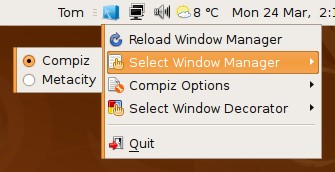
Fusion-icon is included in the Ubuntu 8.04 repositories. You can install it from
the package fusion-icon through apt-get or a graphical package manager.
sudo apt-get install fusion-icon
You can run Fusion-icon immediately by opening the Run Applications dialog
with Alt-F2 and typing fusion-icon. Note that this will cause Compiz to
restart.
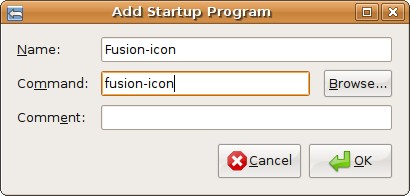
To start Fusion-icon whenever you log in, add it to the Startup Programs list
in System->Preferences->Sessions.
I haven’t found a package for Ubuntu 7.10, but those who are waiting until the final 8.04 release to upgrade can also use the similar Compiz-Switch application instead.
[update] emiligene has posted a Ubuntu 7.10 repository for Fusion-icon in the comments:
deb http://ppa.launchpad.net/maco.m/ubuntu gutsy main restricted universe multiverse
Thanks!
[update] An anonymous commenter has pointed out that running fusion-icon
-n will prevent the application from unnecessarily restarting Compiz when it
starts. You should use this command instead.
Archived Comments
Adam
I’ve been using Fusion-icon with 7.04 for months. I is not immediately available from the Ubuntu repositories, I had to add the compiz-fusion development repositories. So, the same should be possible in 7.10. Just do some googleing for fusion-icon in ubuntu or debian.
Donncha O Caoimh
Cool. I recently blogged that I had to turn Compiz off so I could use sdlmame but if it can be switch on or off without restarting X then it’s worth trying this. Thanks for posting.
Ramy
where is the CompizConfig Settings Manager, I need it. i had it in gutsy, it’s not there in hardy.
this is exactly what i’m talking about: http://wiki.compiz-fusion.org/CCSM
Chonnawonga
You can also enable the icon by going to the Applications menu, then System Tools.
Tom
Ramy:
The package has a different name now, it’s compizconfig-settings-manager.
mike
metacity –replace link that command to a keyboard shortcut and be done with it. metacity –replace && programname && compiz –replace allows you to run a program only after replacing the windowmanager with metacity and restore compiz after you are done using that program.
Mahyar
Works nicely.
Good on ya Tombuntu
tasos
When you log-in and in the previous session you used compiz-fusion, compiz loads up again..
Every time you run compiz-tray-icon it reloads the previous window manager you used (in our case compiz again).
So..when I add tray-icon in gnome-session and log-in the following happens :
Compiz loads because I used it the last time, then gnome launches tray-icon
which reloads the window manager…resulting in a slightly (but noticeably)
slower log-in..
Anyone noticed that?Found a solution?
Thanx and sorry for my english :P
Anonymous
“fusion-icon -n” starts the icon without starting the window manager again
Tom
The anonymous commenter is correct, use ‘fusion-icon -n’ to prevent the application from unnecessarily restarting Compiz. Updated the post.
dwt
Thanks for this article
tasos
thanx for the reply! :D
Anonymous
nice one, thanks :)
myfigurefemale
i did this to fix my video playback and now my windows are all screwed up. i no longer have the x in the top right to close windows and my firefox was resized. i need help!
eli
Awesome! Thanks
Suraj M
I have written a bash script that can facilitate this process. You can even run it in shortcuts and as this handles the program execution and window manager switching automatically, i think it is slightly more useful.
emiligene
Repositories Gutsy:
deb http://ppa.launchpad.net/maco.m/ubuntu gutsy main restricted universe multiverse
deb-src http://ppa.launchpad.net/maco.m/ubuntu gutsy main restricted universe multiverse