
Use Multiple Terminals in One Window
If you’re a heavy terminal user, you probably often use multiple terminal windows or tabs at once. The Terminator terminal lets you split one window into a resizable grid of terminals. You can easily monitor all of them at once at once, prevent your screen from being clutted with terminal windows, as well as use your screen real estate more efficiently.
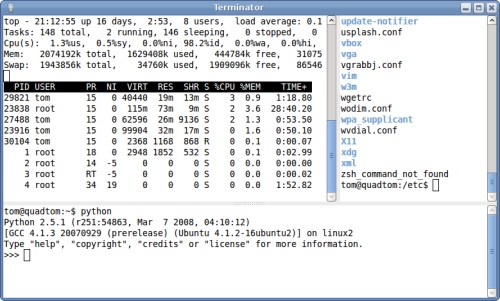
Terminator is easily installable from the Ubuntu 8.04 repositories:
sudo apt-get install terminator
If you are using Ubuntu 7.10, you can manually download and install the same package without any problems. Scroll down to the downloads section of the package’s page, click the all architectures link, select a mirror, download, and install the package.
[update] Newer packages for Ubuntu 7.10 and 8.04 are available from the Terminator PPA.
Start Terminator from the Applications->Accessories->Terminator menu item. You
can split or close the current grid cell using the right click menu, or with the
following keyboard shortcuts:
- Ctrl-Shift-E: split vertically
- Ctrl-Shift-O: split horizontally
- Ctrl-Shift-N: focus to next
- Ctrl-Shift-P: focus to previous
- Ctrl-Shift-W: close
Terminator is very similar to GNOME Terminal, although it lacks the menu bar. However, you can still configure Terminator as it will use the same options as GNOME Terminal. One thing Terminator couldn’t handle was having a transparent background with Compiz, this caused it to use pseudo-transparency instead.
Archived Comments
Scott Wegner
Although not quite the same, another great utility is the ‘screen’ command.
There’s a good tutorial here:
http://gentoo-wiki.com/TIP_Using_screen
It’s basically a terminal emulator, which allows you to host many terminal sessions inside one screen session. Particularly useful for SSH, because you can have multiple terminals, and they can even persist after you disconnect. Terminator seems more user-friendly, but screen has all sorts of options for the power user.
NoNeedForAName
I cut my teeth on screen but found it very limited & switched to tmux.
Darrin
Tombuntu, I was able to install Terminator on one of my Gutsy machines, but on
three others, I kept getting a Dependency error:
Dependency is not satisfiable: python-central
As it turns out, the page that you are linking to only provides .deb files for Hardy, and that package requires that you have python-central version >= 0.6. For Gutsy, the most up-to-date python-central package is version 0.5.15ubuntu2, so there is a dependency issue.
Chris Jones assisted me in Launchpad; he has a Terminator package for Gutsy and
for Hardy located here:
https://launchpad.net/~gnome-terminator/+archive
It might also be worth checking out what he has to say at the support thread:
https://answers.edge.launchpad.net/terminator/+question/27423
Anyway, for any Gutsy users out there who want to use Terminator, this information might be of use to them. Thanks, and I enjoy all of the useful information that you regularly put out on your blog. Cheers!
- Darrin
Tom
Thanks for the heads up, Darrin. I’ll update the post to point to the Terminator PPA, which also has newer versions.
omid mohajerani
very nice - thank you for sharing information
gouki
Great find! Thanks for sharing.