
Turn Ubuntu Blue Using Blubuntu
Spend a lot of time building a non-brown theme whenever you install Ubuntu? There’s a little-known theme called Blubuntu easily installable from the Ubuntu repositories that can switch every aspect of your desktop to blue.
The goal of Blubuntu is to offer a polished and cohesive alternative to Ubuntu’s default theme.
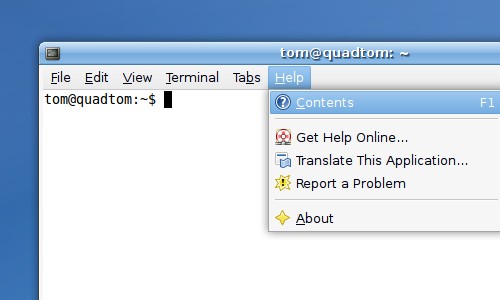
Install the theme’s metapackage to install all the Blubuntu components, including the GTK widgets, Metacity, and GDM login screen themes. Click here to install blubuntu, or run this command:
sudo apt-get install blubuntu-look
Once the theme is installed, it’s easy to switch to Blubuntu. Open Appearance
Preferences from the System->Preferences->Appearance menu and select the
Blubuntu appearance. Once the theme is applied there will be a notice asking if
you want to apply the suggested wallpaper image.
If you want to use the GDM login theme as well, open Login Window Preferences
from the System->Administration->Login Window menu. Select Blubuntu from the
list of themes.
Archived Comments
Tom
Thanks Scott, they both should have been blubuntu-look.
Uli
Blubuntu looks nice bit disables all icons in OpenOffice on my Gutsy system.
1. Quit OpenOffice.
2. Set theme to Blubuntu.
3. Start OpenOffice. No icons.
4. Quit OpenOffice.
5. Switch theme back to whatever it was before.
6. Start OpenOffice. Icons are back.
Anybody else seeing this?
oldcity
bill@bill:~$ sudo apt-get install blubuntu-look
Password:
Reading package lists… Done
Building dependency tree… Done
E: Couldn’t find package blubuntu-look
Trying to install on Dapper Gnome. Not very
good at CLI.
Tom
oldcity:
The packages are only available in Ubuntu Edgy and up.
Uli:
I had this problem also. There’s a blog post about it here:
http://tombuntu.com/index.php/2008/02/27/restore-missing-icons-in-openoffice/
Fred
I am frustrated because I don’t understand the return I get after trying to
install blubuntu. Here’s what it is:
fred@Phoenix:~$ sudo apt-get install blubuntu-look
[sudo] password for fred:
E: dpkg was interrupted, you must manually run ‘dpkg –configure -a’ to correct
the problem.
fred@Phoenix:~$
What am I supposed to do? Manually run? Where?
Thanks!
Fred
Please disregard my note of 3:03 p.m. Google helped me with run ‘dpkg —configure
-a’ —
sudo dpkg –configure -a
sudo aptitude clean
sudo aptitude update
sudo aptitude upgrade
After that got cleared up, I was successful in installing BluBuntu! It looks
great! Thanks for your hard work. Obviously, I am very new to Linux/Ubuntu.
ney frota
dont do by CLI
use synaptic
System -> administration -> synaptic
then click search, search for “blubuntu-look”.. in the list, mark blubuntu-look to install, accept the dependencies then click apply to download and install.
Abhisek
I only liked the wallpaper! :(
Anonymous
Is there a greenbunutu
Brett
Any advice on whether there is an Emerald theme that goes nicely with Blubuntu?
Eloi
nuoveXT icons go great with it.
Brisbane SEO Company guy
Thanks for the tip. As much as I like the brown theme some of my co-workers just don’t get it. Blubuntu may just tip them over the edge.
Is there a Macbuntu?
setonfire
Tom how do I completely remove this theme? Synaptic shows up a lot of ‘blubuntu’ entries and I am not sure which ones to remove.
Tom
setonfire:
You can remove the packages blubuntu-look, blubuntu-gdm-theme,
blubuntu-session-splashes, blubuntu-theme, and blubuntu-wallpapers.
setonfire
Thanks for that prompt reply Tom!
macnet
once again thanks a lot for your very useful hints!
Anonymous
Installing this package will uninstall ubuntu-desktop, which is NOT a good idea. For some reason, the human theme conflicts with gtk2-engines-ubuntulooks, which Blubuntu depends on. I don’t see why there is any conflict. I wish this would be fixzed so we can have both Human and Blubuntu installed and choose between them.
cmr
I switched to Xubuntu, that’s nice and blue.
Scott Wegner
Just wanted to let you know that Google Reader doesn’t like your apt: installer link. Also, is there a reason that the link and the command point to two different packages? (blubuntu-look seems to be the metapackage, but the command is for blubuntu-theme).