
Fix Dark Video Playback
For a while I had been noticing that video playback in both Totem and VLC was too dark. Using VLC I could manually adjust the brightness to watch videos normally. Today, I found how to fix the problem.
In Totem’s preferences dialog, the slider for brightness was turned down. I
clicked Reset to Defaults and videos system-wide started to play normally.
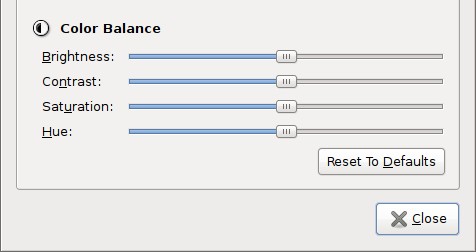
Maybe I was just messing with these setting a while ago and forgot. What makes me think otherwise is that the slider for brightness always drifts a small amount after I play a video in Totem. Has the brightness setting been slowly getting darker and darker over time? Has anyone had this problem?
I found a thread in the Ubuntu Forums that could be related.
Archived Comments
allad
I have that problem too. The sliders in Totem just keep drifting away. I have to reset them every time. It would be very nice to find a way to prevent them from changing. Does it having something to do with the GPU? mine is an Nvidia 8400. Do the ATI guys have that issue too?
Martin
Never thought that the solution is sooo easy.. Thank you!
BadServo
Yeah, this issue has been driving me nutz. The slider drifts a minute amount to left each time I check it. There appears to be no specific cause.
Schitso
I had the same problem with an NVidia video card. Open a terminal or press Alt+F2 and run gstreamer-properties, go to the video tab, and change the default output plugin from default to X Window System (No Xv).
nvalias
To Schitso above: That disables anti-aliasing etc. by the card leading to pixelated/jagged edges . A better is to start video playback, pause it, open the nvidia control center and click the ‘Reset Hardware Defaults’ button in the ‘XServer XVideo Settings’ tab.
Lcnrj
Doesn’t work in karmic
pgn674
Thanks for this. It was affecting VLC for me, too, and this fixed it. Weird that Totem settings affect video playback system wide, especially VLC which I thought was atomic unto itself. I haven’t looked for the sliders to drift, but I will from now on. The dark video problem I got did seem sudden, though; not gradual. And I can’t think of anything that might have moved those sliders. I have an Intel video chipset on a Lenovo laptop: Mobile 945GM/GMS, 943/940GML Express Integrated Graphics Controller.
George
Great tip, thanks!
This seems to be a bug related to Totem - and haven’t fixed since months now. It’s better to check the bug reports, hopefully someone is already working on this issue.
Knud
I got this problem after updating my ubuntu.
VishR
In Totem all the videos were dark intially. I was wondering if my eyes were ok, then I checked the Display preferences and found the sliders in disarray. I clicked on ‘Reset to defaults’ and adjusted the display to my requirements. After reading this post, I checked ‘em again, I feel they are in the right place.