
Create a Virtual Monitor Power Button
A friend had an interesting problem for me to solve; he wanted to know how to turn off his laptop’s monitor without shutting down the system or waiting for it to go off. He wanted to leave it working during the night on the desk in his room, without the light from the LCD bothering him while he slept.
Luckily there is a Linux command to do just about anything. To turn off your monitor from a terminal, run this command:
sleep 1 && xset dpms force off
Moving the mouse or pressing a key will turn the monitor back on.
The sleep 1 (wait for one second) is needed only when you are typing the
command in a terminal. This is because the command is executed as soon as the
enter key is pressed, when it lifts up X turns the monitor back on.
The xset command is used for setting X display preferences. In this case it
uses VESA Display Power Management
Signaling
to turn off the monitor.
You can create a desktop or panel launcher to do the same thing.
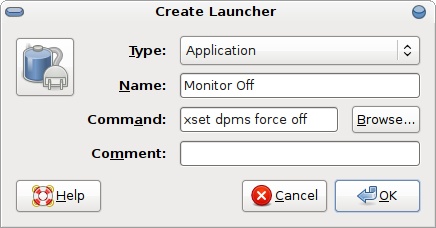
Right click on the desktop and select Create Launcher. Use the command xset
dpms force off, give it a name, and choose a nice icon. You can also drag it on
to your panel for convenient access.
[update] An anonymous commenter asks: Is there anyway to lock the screen and power down the monitor in one launcher?
Use this command to run the screensaver (which will lock), wait, and then turn off the monitor:
gnome-screensaver-command --lock && sleep 2 && xset dpms force off
Archived Comments
mike
Awesome tip. I have a problem though :(
It works great from the terminal but when I create a custom launcher and execute it, the screen simply turns off then turns back on. Pretty similar to what happens in the terminal if you leave out the sleep command.
Any ideas?
mike
Hmm, I should have added what I run - that might help huh !
Ubuntu 7.10
nvidia 8800 GTS w/ 169.04 nvidia drivers
desktop effects enabled
If you need any others, let me know.
Tom
mike:
the only thing I can think of would be to try creating a launcher with a longer
sleep time.
mike
It works great!!
Silly me, I believe it was just me slightly moving the mouse after letting go of the button. Put it towards a case of PEBKAC I think :)
wohooo
Thanks you so much!
Kevinator bob!
Thanks for the tip! I am going to use this all the time instead of reaching all
the way over to push that button.
thanks for the info
Anonymous
Is there anyway to lock the screen and power down the monitor in one launcher?
Aimevous
Hey, not sure why the application launcher method isn’t working for me.
I double clicked it and nothing happens.
But the command works in terminal.
I’m running ubuntu 8.10. any suggestions?
thanks!
bthomson
Thanks, that’s exactly what I wanted to do as well: sleep while the computer is on.
Anonymous
To lock the screen and blank the monitor press the Crtl+Alt+L combination
Anonymous
This is sweet, thanks
I’ve been looking for a way to turn my monitor off after i’m done watching tv shows without having to get out of bed
Anonymous
um close the lid? just make sure it doesnt hibernate or shut down etc
sports picks
How can you not love Linux? Great post.
Anonymous
Really interesting problem… Hows about just closing the lid…
jonny rocket
this will come in handy some day.
Anonymous
Why not just turn the monitor off?
Ignas
Why not just turn the monitor off?
Turn off laptop monitor if you can :P
Scott Maddox
I’d like to point out that by switching ‘off’ to ‘on’ you can wake up the monitor. I’m using these for turning the screen off when I’m going to sleep, then I have my alarm script turn the screen back on and open up firefox to my morning lineup. Saves me a good minute every morning.
uffek
Great!
The next command placed in /etc/crontab will turn on the monitor at desired
time:
/usr/bin/xset dpms force on
Lila
This worked perfectly! Thank you so very much!
Just a question tough, Does it switch off the backlight too? Sorry if it’s a
silly question but I read that the backlight doesn’t turn off easily or
something like that.
Tom
The backlight should switch off.
David
This does not work anymore on ubuntu 10.04? Any idea
Tom
It’s still working on all my systems.
aspirinc
How can you not love Linux? Great post.
patss
can you not love Linux?
thank you very much indeed for that ;)
Andrew Conkling
You can also use Brightside bound to a screen corner or edge if you prefer.