
Benchmark Your Linux System with HardInfo
Want to compare your computer’s performance? HardInfo is a system profiler and benchmark for Linux systems. It can gather information about your computer and operating system, perform a varitety of benchmarks, and export the data to HTML.
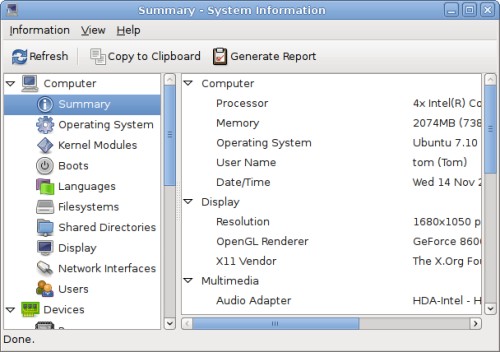
The easiest way to browse the reports is to run them all by generating an HTML
page. Click the Generate Report button on the toolbar, and select the
information you want included. Generating a report including the benchmarks
could take a few minutes depending on how fast your computer is.
In my Ubuntu 7.10 system, the ZLib benchmark could not be performed. This caused an error to be displayed, but HardInfo continued with the others just fine. Here are the results from my Intel Core2 Quad Q6600:
CPU ZLib (higher is better)
This Machine 0.000
CPU Fibonacci (lower is better)
This Machine 3.983
CPU MD5 (higher is better)
This Machine 80.238
CPU SHA1 (higher is better)
This Machine 91.110
CPU Blowfish (lower is better)
This Machine 13.616
FPU Raytracing (lower is better)
This Machine 18.659
HardInfo is in the Ubuntu repositories. Ubuntu 7.10 users can install it with
this link: Install HardInfo. Alternatively, you can install
the package hardinfo from the command line or though a package manager.
[update] To fix the ZLib benchmark, run apt-get install zlib1g-dev.
Archived Comments
mariuss
Looks like a nice tool, but very unstable.
Selecting “Operating System” or “Languages” for example just closes the whole app (no errors, it just vanishes).
Running Gutsy i386.
Tom
Anubis & mariuss,
If it’s crashing when selecting sections, just generate an HTML report to view
in your browser instead of looking at the data inside HardInfo.
dave
Yep crashes like hell here as well..
habtish
Nice tool, but very unstable. Selecting sections is unthinkable… I also found a couple of LP bugs filed a while ago but seems like no one has taken any action. Would be nice if the package maintainer upgraded the repos to the latest upstream release.
sonicgrass
This was cool and helpful, now I’ve got to look up everything and figure out what all of the elements are.
zyga
just works
interesting only why in some tests my machine is 1st in some just last ;-)
MysteryMF
Install your zlib using apt-get install zlib1g-dev then re-run your hardinfo report. My scores are much better on a AMD 64 Processor
AMD Athlon™ 64 Processor 3800+
Memory 1997MB (969MB used)
Operating System Ubuntu 7.10
What do you have your concurrency set to?
Zlib 20404.837,
Fibonacci 3.490,
MD5 47.381,
SHA1 68.948,
Blowfish 17.056,
Raytracing 12.385…
Tom
MysteryMF,
Thanks for the command to fix ZLib. Concurrency is set to none.
ZLib 17917.774
Fibonacci 3.990
MD5 79.706
SHA1 91.148
Blowfish 13.614
Raytracing 18.733
Paco
ZLib 29264.719
Fibonacci 3.254
MD5 75.775
SHA1 114.178
Blowfish 11.052
Raytracing 7.213
[paco@computer ~]$ cat /proc/cpuinfo | egrep -m 3 “model name|MHz|cores”
model name : Intel® Core™2 Quad CPU Q6600 @ 2.40GHz
cpu MHz : 3005.553
cpu cores : 4
[paco@computer ~]$ cat /proc/meminfo | grep MemTotal
MemTotal: 2062284 kB
Paco
Another benchmark is calculating pi with the bc commandline calculator.
time echo “scale=5000; 4*a(1)” | bc -l -q
real 0m27.210s
user 0m27.115s
sys 0m0.042s
prashanthellina
Intel core 2 duo E4500 for the pi test.
real 0m49.327s
user 0m49.215s
sys 0m0.012s
sloggerkhan
I wish this benchmark actually supported multiple cores. :(
peter
It’s quite a cool program!
It even supports submitting your results with the “network updater” menu option. That also gets you the scores of other people so you can compare.
Like it!
Flanker20
Hello,
Looks nice, too bad it doesn’t work on my 64 bits feisty fawn : I cannot select any section or even generate an HTML report.
Each time I try it shutdowns my session or in some case the hardinfo. Cannot have any result, info on my computer or whatever else…
I tried to reinstall 3 times, and got the zlip patch using apt-get. It doesn’t change anything.
Anybody knows how to solve that ?
Anonymous
Flanker20,
Sounds like your problem related to X, do you happen to run compiz? If so, try disable compiz and run this thing.
2 dual amd 285's
Processor : 4x Dual Core AMD Opteron™ Processor 285
Memory : 3066MB (830MB used)
Operating System : Ubuntu 8.04.1
- -CPU ZLib-
- 27118.704
- -CPU Fibonacci-
- 3.215
- -CPU MD5-
- 58.691
- -CPU SHA1-
- 75.856
- -CPU Blowfish-
- 14.425
- -FPU Raytracing-
- 10.811
oboltyo
Nice-
I must have missed this little bugger over the last few years, Anyways here are
my stats for AMD Quad 9850:
CPU ZLib
This Machine 30168.986
CPU Fibonacci
This Machine 2.417
CPU MD5
This Machine 57.277
CPU SHA1
This Machine 99.747
CPU Blowfish
This Machine 14.634
FPU Raytracing
This Machine 9.422
hi
Too bad it only benches one core. It doesn’t multithread. So to compare you have to adjust the scores by the number of cores you have, and the other person had.
Nacho
It also crashes a Dell Studio XPS 13 running Ubuntu 9.04 RC 64-bit :-( Not only hardinfo… the OS itself :-((
nitr0ix
great tool. works 100% on Arch linux.. no crashes detected. GREAT adn HUGE thanks
dimeo
somethings weird here.. it says a celeron is faster than my core2 1.83GHZ
bob
fibonacci 2.493 owned!!!
intel 3.0 ghz core 2 duo
4 gb ram
nvidia 9400 gt
Peter
I’ve seen a good article about several file system benchmark tools in Linux:
http://redes-privadas-virtuales.blogspot.com/2009/09/file-system-benchmark-en-linux.html
Father D
Love this prog … been using it on different builds for about 3 years.
Latest is OC’ed Athlon II X2 250 running at 3.37Ghz 4Gb DDRII 800 crappy onboard
graphics!
Fibonacci 2.04 :)
Is does crash occasionally, when updating on network, and sometimes on some benchmarks … then it runs perfect on 2nd time of asking!
Jam
Tried this on ubuntu. Lol… get different numbers every time, and ubuntu crashes. Seriously, i’m switching distro to something that works
Alberto
Great tool
Processors
AMD Athlon™ II X2 240 Processor 1600.00MHz
AMD Athlon™ II X2 240 Processor 2800.00MHz
PU Blowfish
This Machine 1600 MHz 7.679
CPU CryptoHash
This Machine 1600 MHz 191.557
CPU Fibonacci
This Machine 1600 MHz 2.144
CPU N-Queens
This Machine 1600 MHz 11.365
FPU FFT
This Machine 1600 MHz 3.507
FPU Raytracing
This Machine 1600 MHz 12.580
Anubis
Nice, wish it’d not crash on my 64bit Gutsy.