
Hide Partition Icons From Your Ubuntu Desktop
Ubuntu will place icons for other partitions on your desktop. Do you like a clean desktop, or just don’t always need access those other partitions? Changing a value in the GNOME Configuration Editor will stop partitions from being displayed on your desktop.
Press Alt-F2 to bring up the Run Application dialog. Type gconf-editor and
click Run.
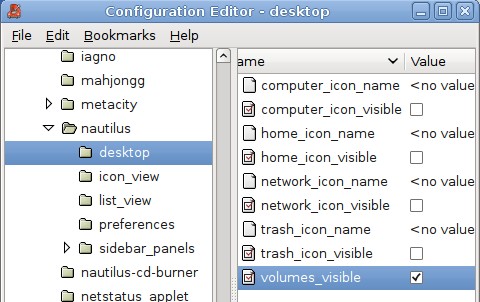
In the left pane of the window, browse to apps->nautilus->desktop. Uncheck the
volumes_visible option and the partitions on your desktop will disappear.
[update]
Want to keep shortcuts to some partitions but not others? Follow the other directions, and then and can create your own launchers for the partitions you want.
Right click on the desktop and click Create Launcher. In the Type drop down
box, select location. Then you can give the launcher a name and the location you
want to link to. You can find the hard drive icon in
usr/share/icons/gnome/scalable/devices/ if you want to use it. The resulting
launcher will act just like the ones that you removed in this post.
Archived Comments
helai
good,but if I only want to hide part of them?how can I do?
Andrew Conkling
Yes, I played with this setting before, but it hides my music player when I mount it.
I seem to recall remounting my other partition to /mnt instead of /media, but I can’t recall exactly what I ended up doing to fix this. (I need to do it again with Gutsy.)
Tom
helai,
I updated the post explaining how you can create launchers for the partitions
you want.
Andrew Conkling,
Mounting the other partitions to /mnt should solve the removable drives problem
according to this post:
http://ubuntuforums.org/showthread.php?t=114369
ney frota
I do different!
I leave volumes visible checked, so if I plug my usb, he show up on desktop,
Then I rename the volumes that I don’t want on desktop with something start with point “.” … then he get hide from desktop but show on nautilus tree and places menu. ( I have lot of ssh mapped drivers like that)
If I want see on desktop, just click on desktop and press control-H to show hide things
brokencrystal
ney fronta: That is a great idea! Maybe in the future, we will have a little more power to pick what is shown on our desktop via GUI…?
helai
ney frota
I ’d like yours way,but would you please tell me where and which command to
rename the volume?
also thank tom,yours way is also good.
ney frota
oops! my bad! i have only ubuntu (no windows or other funny partitions).. but lot lot of ssh and ftp connections. The dot-to-hide works fine on my connections.
I try the dot-to-hide im my memory card (right click the icon, properties, driver tab and change mount point to .mcard, then eject, re-insert) but does not work on desktop. :( if you go to /media folder you can check its hidded, but nautilus desktop dont follow the dot-to-hide rule…
I dont know why nautilus (or HAL.. or gnome) does not follow the dot-to-hide rule for drives too. Works flawless to other (gnome vfs) mount points. The logic say need be hidded :)
How can we check if this is really a bug and how to help?
ps: if you add a “wrong” (with / char or some weirdo) mount point, you cannot
mount the drive any more. but its easy to fix. just follow this info.
https://bugs.launchpad.net/ubuntu/+source/gnome-mount/+bug/107668
Jesse james
Turn of desktop icons completely!
gconftool-2 –set –type=bool /apps/nautilus/preferences/show_desktop false
Anonymous
I just tried the . name hide trick and the behavior still exists in 8.10. So great idea but does not work like that.
John Wells
To hide partitions mounted in fstab, just mount them under /mnt/ . If they are mounted elsewhere, the icons show on the desktop.
Rune Svendsen
Thanks John.
Mounting in /mnt/ instead of in /media/ hides it from nautilus and my desktop.
dario
thx :)
Hung
Thank you very much!!! It is helpful.
Anonymous
You can also hide mount points by moving them outside the screen.
With gconf-editor, change ‘nautilus-icon-position’ in /apps/nautilus/desktop-metadata
yanagi
as you know, if it is mounted on your home or on media, it will be shown in Desktop.
I wanted to locate it on my home directory, and to see the other icons like usb memory on desktop, i used following.
1. mount your device on /mnt
sudo mkdir /mnt/newdevice
change fstab properly to mount it here
2. you may see its disappeared from desktop.
3. make shortcut on your home directory.
ln -s /mnt/newdevice /home/yourname/storage
now I can access sshfs and smbfs and new harddisk directly from my home directory, and they are not shown in desktop, plus, if I attach my usb memory, then it correctly shows the icon in my desktop.
lion
Thanks Yanagi for the first good and versatile idea I read in the comments.
Azrael Nightwalker
You can also do it with Preferences Hide and Seek
http://hideseek.sourceforge.net/