
Theme Applications Running as Root in Ubuntu
Once you start installing new GTK themes in Ubuntu, you will notice that applications that run as root, such as the Synaptic Package Manager, look unthemed and ugly. This is because although the root user is hidden in Ubuntu, it is still technically a separate user with separate appearance settings.
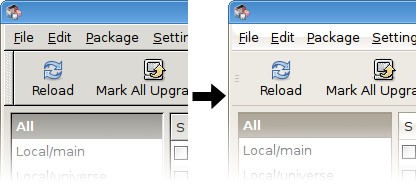
To fix this, run these three commands in a terminal. They will cause your own theme, font, and icon preferences to always be used by the root user.
sudo ln -s ~/.themes /root/.themes
sudo ln -s ~/.icons /root/.icons
sudo ln -s ~/.fonts /root/.fonts
Leaving your root applications unthemed does an have one advantage, it reminds you when a running application has root privileges. Other than that I see no reason why this should not be the default for Ubuntu.
Archived Comments
Chris I
I do this on my system, and the only issue I have experienced is if you have multiple users in the admin group with custom themes installed.
dmi3j
COOL! Thanks for this.
ney frota
i prefere root using a diferent theme … then i know its runnig as root or running as me
but i agree the default root theme its ugly
t3mujin
Leaving your root applications unthemed does an have one advantage, it reminds you when a running application has root privileges. Other than that I see no reason why this should not be the default for Ubuntu.
And that’s a important reason…
Aquiles
this run fine
mv ~/.themes/* /usr/share/themes
now when you select one theme this theme is applied trought all the system.
the same apply to icons, cursor themes must be put on /usr/share/icons/ and you
must to run update-alternatives to change the gdm cursor.
Ubuntu User
Hey:
Just wanted to say you friggin’ rock for posting this tip. I had just finished
installing the Clearlooks Compact theme, and upon looking at Synaptic, I
remarked to myself “This looks hideous” (I know this seems too coincidental to
be true, but I swear to God it is). Of course, I didn’t even know why it was
ugly - I had erroneously assumed it was the theme’s fault.
Keep up the good work !
Gary
THANKS!!!
Furthur
thanks m8!
Dug
thaaaaank youuuuu
Paul
Gracias!
Vadim P.
Wow. Kin is interesting… thanks for the link
pew pew pew
Q: how do I change the theme for root?
Tuan Anh
Thanks for the good tip.
fazil
Thanks for the tip. But I dont agree that themes for the root user should be ugly. Maybe the title of the window can show a lock sign or a witten word root. There is no point in keeping th eroor themes ugly.. this saves space because You dont have to install theme for each user
Yaro
Interestingly enough, I think GNOME 2.26 did this for me. Or for some reason when GNOME 2.26 came downstream to me on Arch it suddenly started sticking with my themes.
Note that this isn’t really Ubuntu specific.
starcannon
Love tombuntu.com; that said, I don’t think this is a very good idea. Run as root only when absolutely necessary, and then make sure it looks as ugly and different as possible so you don’t have your self an, “Oh noes I manglez my cpu’s” moment.
Brayan Habid
How can i undo this? it’s just that now nautilus doesn’t let me rename files, and i want to know if it’s because of linking those folders.
VCoolio
To manage themes for root create a file /root/.gtkrc-2.0 and inside specify
theme and icons. This way you can have a decent theme for root apps that is
different from user settings. Be sure to have specified theme and icons in
/usr/share/themes and /usr/share/icons. Use lines like this (and use the exact
theme names, check index.theme files inside the (icon)theme folders for that):
gtk-theme-name=“Human”
gtk-icon-theme-name=“Tango”
JeanJean
Help me ! it’s works ! :D
JeanJean from France ;)
Ogurets
Qt Creator looks awesome under root (Ubuntu 12.04 LTS)! I would love to see that style on every linux I work with. But KDevelop looks like shit. Under “normal” user they both look the same. What kind of sorcery is that?!
Tiago Rodrigues
I totally agree with you. This should be a default thing on Ubuntu. A global look and feel is something that’s needed to create less confusion on new users and a more professional feeling.
Have you tried submitting this as a suggestion on the bug tracker ? Maybe someone already did before. I already thought before about researching more on this subject but time is limited :|