
Ext3 File Systems in Windows
[update] I’ve writtenan updated version of this post.
Currently I am using a large FAT32 partition for sharing files between Ubuntu and Windows. I would like to keep everything in a large Ext3 home partition. The problem is that Windows does not support any Linux file systems. I tested two programs that fix this by adding an Ext3 driver to Windows XP.
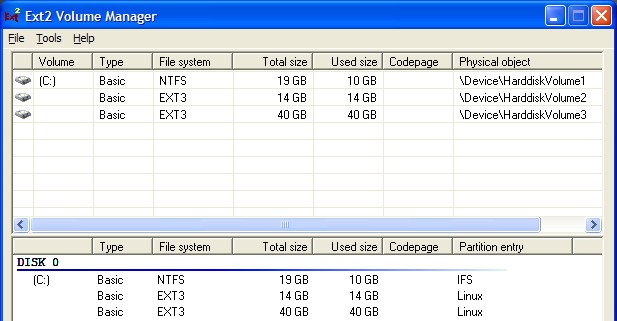
Ext2Fsd is an open source driver for Ext file systems that works in many versions of Windows. The “Ext2 Volume Manager” allows mount points to be set. I right clicked on my home partition and clicked mount. It was then mounted it to the L drive letter. However, Windows saw the file system type as raw and offered to format it. Ext2Fsd did not work at all for me.
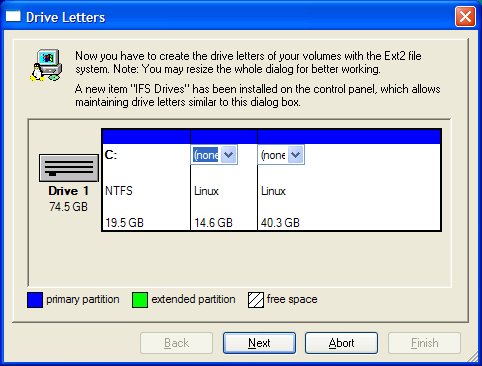
After uninstalling Ext2Fsd and rebooting I tried Ext2 IFS. Ext2 IFS is not open source but is freeware. During the install a diagram of my hard disk let me assign a drive letter to my home partition.
It works! My Ext3-formatted home partition works seamlessly in Windows. Programs are able to run off the partition and save to it with no trouble, and the speed feels the same as using NTFS. My only problems with it are that it is case-insensitive, and that dot files that are hidden in Linux have no way to be hidden in Windows.
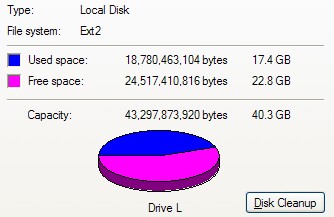
Ext2 IFS looks like an excellent way to use Ext3 as a cross-OS file system. I will continue to use it in Windows XP, but it is not supported in Windows Vista. This means that I will have to continue searching for a solution that will work with my new computer that will have Vista.
Archived Comments
Tom
Ralph,
It doesn’t look like there is a Windows driver for writing to ReiserFS. But
these two can read it:
http://p-nand-q.com/download/rfstool.html
http://rfsd.sourceforge.net/
Lasse Havelund
This means that I will have to continue searching for a solution that will work with my new computer that will have Vista.
…you mean you’re not going to do any effort to rid yourself of Vista? Disgraceful. :(
Tom
I own a few games that I have not managed to get working in Wine, so I will continue to dual boot for now.
Dody Suria Wijaya
>>However, Windows saw the file system type as raw and offered to format it. Ext2Fsd did not work at all for me.
You forgot to start the service. Go to Tools->Service Management, then press Start.
Tom
@ Dody Suria Wijaya
Uh oh, it looks like you are correct! Thanks for letting me know.
phillip
Good content. This is a nagging problem that I hadn’t tried to look for a solution to.
the Hopmaster
I still think a fat32 volume is still a very handy thing to have around. It allows you a space where you can place files that you know that you will shred later. The GNU shred man page warns that journalizing file systems may not work well with shred.
Thank you for this tip, Tombuntu!
yaserxp
For Vista, you can try DiskInternals Linux Reader.
It is not open source but it is freeware, and I just installed it on Vista Home
Premium and it worked.
Regards,
Yaser
Lars
DiskInternals Linux Reader nor IFS work for me. Linux Reader says it has mounted
the partition. I still can’t access it then, outside or inside Linux Reader.
With Ext2IFS I get a “Local Drive” that Windows wants to format. Otherwise it’s
useless.
Any other suggestions ?
Tom
Thanks Yaser, I’ll try that one out soon.
melli
I installed ext2 IFS, numbered the drives and now can access everything. Then only problem is that the windows driver does not respect the access policies, i.e. one can even access sensitive data. How can I install (partially) encrypted FS in Linux?
Thanks for keeping up this page
Melchior
adpads
well, ext2IFS works for me, but it conflicts with Truecrypt. When Truecrypt tries to mount a volume under windows when ext2IFS is installed, the system hangs or gives me the blue screen of death. Does anyone else have this problem?
ram
Yes, I experience the same behavior. I too have ext2IFS installed and when I try to mount a TrueCrypt volume windows hangs. Closing truecrypt or rebooting doesnt work. Only thing that you can do then is to reset the machine.
alex
Hello all,
I found this blog entry because I had a similar problem (ext3 formatting a partition and mounting it under windows), although not with truecrypt. I tried “EXT2FS Anywhere”, “EXT2 IFS” and many other tools, and no success.
But: I found a solution how to get around windows not being able to find valid data, and offering to reformat it. I am now able to use any program / service to provide access to my ext2/3 partitions!
In linux there is a file /etc/mke2fs.conf . The e2fsprogs package contains it. All newer distributions provide additional filesystem features, like “ext_attr” and allow you to specify the inode size. Comment out the “inode_size” and remove the “ext_attr” from the “base_features”. Also make sure your “inode_ratio” is set to 8192.
Now you can format your partitions all day long and make use of them from windows. Btw.: Make sure you have a backup of your data prior to formatting the partition in question.
Cheers!
oscarmontaner
Hi… i was checking it out, and I could realize that the newest version of Ext2 IFS supports Vista and file names that start with a dot “.” character are treated as hidden. Your search has finished.
radekg
I experience problems with Ext2 IFS + Truecrypt. When Truecrypt tries to mount the partition it reboots the computer. Funny thing though, when I mount the crypted partition first and then install ext2 IFS and mount ext2 partition everything seems to be fine. *sigh*.
Adrien
I am experiencing the same problem with ext2ifs + Truecrypt under Vista and XP.
When mounting the partition, the system either crashes (Vista) or reboots
(XP).
Does someone have a solution to this problem?
Thanks in advance
EmJem
Ext2IFS v. 1.11 does indeed crash with TrueCrypt 4.3a and 5.1, when mounting a TrueCRypt volume. I have found that Ext2IFS v. 1.10c on Windows XP does allow TrueCrypt 4.3a and 5.1 to function without crashing. It doesn’t help those of you with Vista as Ext2IFS v. 1.10c is not Vista compatible (i believe). Good luck.
username
vista works fine with 1.10c, just turn on compatibility mode on the setup file. only thing that doesn’t work is the control panel IFS thing. (but that’s not important if you use truecrypt anyways)
same problem here, with truecrypt and 1.11, would apreciate some resolution, but found none yet.
Gadren
Thank you so much for the help in the comments! EXT2IFS v1.10c works perfectly.
Anonymous
Ext2 IFS 1.11 & Truecrypt 6.0a (on Vista 64 bit):
I can mount my Truecrypt volumes if I select “Mount as removable Media”. If not,
Vista will give me a bluescreen.
Anonymous
I just experienced crashes with Vista and TrueCrypt, which lead me to this page. For me also mounting as removable media prevents vista from crashing. I have ext2 IFS 1.11 installed.
Anonymous
Same issue here using 1.11 and Truecrypt on XP Pro SP3. BSOD during use of truecrypt.
4o66
Confirmed that setting TrueCrypt 6.0a to Mount as Removable Media keeps the IFS driver from causing a BSOD in Windows XP (x86).
Anonymous
Truecrypt+ext3 problems here, too.
I can keep Windows from crashing via the removable option, but I can’t get
ext2ifs to do its job. I just get another drive that Windows wants to format.
akkoy
same problem with ext2 and truecrypt.
google teleported me here :)
Anonymous
Ext2 IFS 1.11 & Truecrypt 6.0a under XP: I confirm ‘mount as removable media’, but the performance is very poor
headhunter
Dudes,
Accessing / from Windows does not seem to be good idea. This way you compromise
the whole thing that makes Linux safer than Windows.
Isn’t it better to just mount the separated /home partition (you should have
one)?
kija
I had the same problem BSOD in windows xp sp3 but i updated to ext2ifs 1.11a and true crypt 6.1 it works now.
Oliver
hi,
I installed ext2ifs 1.11 onto vista and worked fine reading/writing Linux
partition at drive L:
however, this worked only once. next time I tried (maybe after reboot, I don’t remember) I still see drive L: but clicking only prompts to format the driver. Never got out of this again. Reinstalling ext2ifs and rebooting changed nothing. any ideas?
Jon
Seems like it’s fixed now!
From the changelog for ext2ifs 1.11a:
Bug fixed that caused a blue screen when the Ext2 IFS 1.11 software was used together with the Truecrypt disk encryption software.
panel anten
is there a way to format ext3 a HDD on windows XP ?
Jack
any chance to get the ext2/3/4 FS under windows but with keeping the file names
sensitivity?
I need to have in one dir a lot of files with same names but different
capitalization
Best Bitter
I’v just installed Ext2 IFS 1.11a in Windows XP but all I seem to be able to do is look at the drive (an external usb HDD). I can also see the drive in My Computer but clicking on it merely brings up a dialog box asking if I want to format the drive, which I do not as it has data on it I wish to access.Tthere is clearly something I should be doing but cannot establish what this should be. Does anyone know?
Paul McEnery
@Best Bitter@
I had this problem and discovered that the issue was; the ext3 filesystem had exceeded the maximal mount count. Mount the filesystem under Linux with Truecrypt and take a look at dmesg output. Also, tune2fs -l /dev/mapper/truecrypt1 (assuming this is what the loop device was setup as).
I gave it an fsck (e2fsck -y /dev/mapper/truecrypt1) and upped the maximal mount count from the 27 default (ubuntu karmic back then) to 100 (tune2fs -c 100 /dev/mapper/truecrypt1).
Plugged it into windows (XP SP3), mounted up in truecrypt 7.0a (IFS 1.11a), and all is working correctly.
Just thought I’d post this to help any hapless souls in future…
Ralph
very nice, but I don’t think it will also support ReiserFS. Do you know about one that supports also ReiserFS?