
SimCity 4 on Ubuntu with Wine
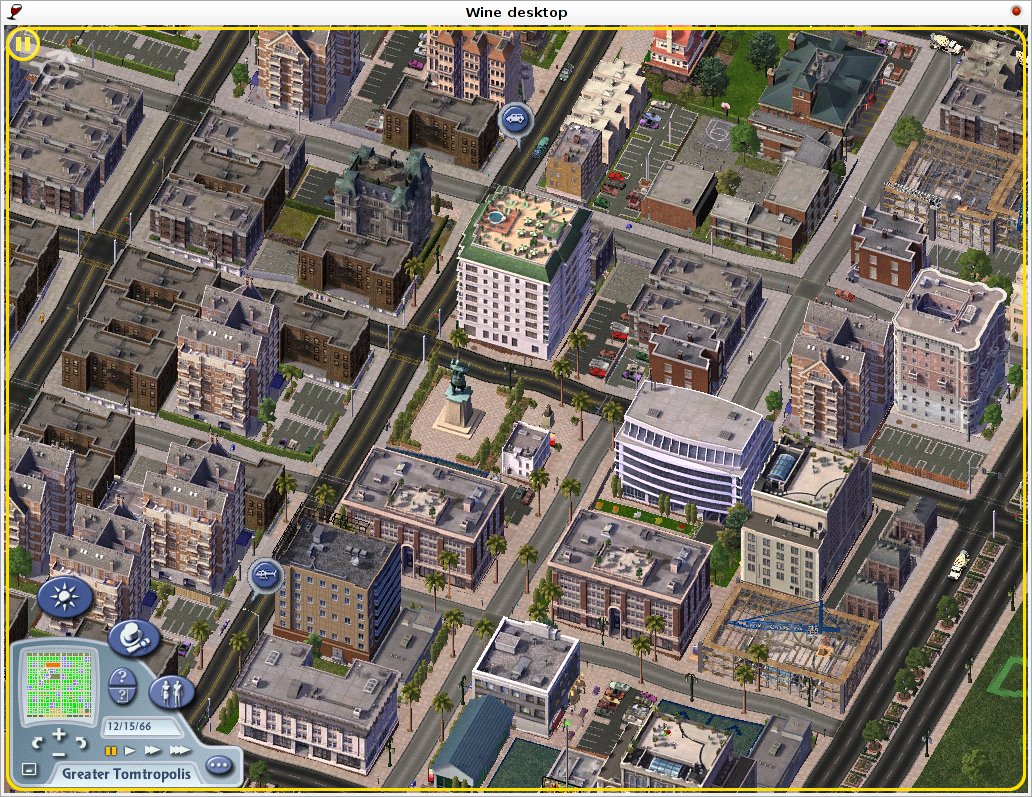
Another one of my favorite Windows-only games is working great in Linux. Today’s post will tell you how to install SimCity 4 and the Rush Hour expansion pack in Ubuntu. This was done with wine-0.9.34, Ubuntu 6.10, and with an ATI X300 SE graphics card.
I used all the same Wine settings for Simcity 4 as I did in my previous post about Guild Wars. Set these settings in winecfg:
- Windows version: Windows XP
- Emulate a virtual desktop
- Vertex shader support: Hardware
- Allow pixel shader
- ALSA audio driver
- Audio hardware acceleration: Full
I also added these strings to the Wine registry under
HKEY_CURRENT_USER\Software\Wine\Direct3D. Use regedit.exe in your Wine
directory to add them. These registry changes are for improving performance, so
this step is optional.
"DirectDrawRenderer"="opengl""OffscreenRenderingMode"="backbuffer""opengl"="enabled""RenderTargetLockMode"="auto""UseGLSL"="disabled""VideoMemorySize"="256"
Wine is now ready for Simcity 4. Copy the two SimCity 4 install disks and the Rush Hour install disk to separate folders on your hard disk. Launch the SimCity 4 installer from the first folder with Wine. The progress bar does not work so just wait until it prompts you to insert disk two. Then, rename the first install directory to something else. Rename the directory containing the second disk to the original name of the directory the installer is running from. This tricks the installer into thinking the disk was changed.
When the install finishes, it will attempt to start SimCity, which will fail because of the copy protection. We are not going to fix that yet. First we need to install Rush Hour.
Launch the Rush Hour installer from your folder on disk. This time the progress
bar works. When the install is finshed SimCity will try to start and fail. To
make it work you need a cracked SimCity 4.exe that skips the copy protection.
Make sure the executable you use is for the retail (unpatched) version of
SimCity 4 Rush Hour. Once you replace the old executable with the cracked one,
you need to run it like this: wine SimCity 4.exe -d:software.
And that is it! The only problem I have encountered while playing is a few small graphical glitches while using the query tool. The game seems to run at about the same speed as it did in Windows.
Archived Comments
Chonnawonga
This works for me right up to the point where I have to change CDs: renaming the directory doesn’t seem to be working. It keeps telling me to insert Disc 2. Is it possible this is due to a change in the software between Feisty and Gutsy?
Andy
Chonnawonga: I’ve found that in Feisty at least, changing the directory name doesn’t work. However, if I insert the real disc 2 into my CD-ROM then click OK, it’ll install fine from it. Hope this helps.
Benny
I successfully installed the game, but it blatantly refuses to launch!!! Why? I’ve tried booting it from the Applications>Wine>Maxis>SimCity 4 menu, I’ve tried booting it from the terminal, and from the CD. The uninstall works, but fails to uninstall the game. Any advice?
puck
The way I have it setup is:
multi-boot Ubuntu Hardy with a preexisting Win2k partition mounted as /windows.
install in windows, and point launcher command wine to /windows/..simcity4directory/ then all saved games from within ubuntu are in /home/user/.wine/
to install only in hardy, just cp each cd of sim city 4 to a FULL ACCESS folder (i use my torrent downloads folder) with the above mentioned folder changing structure. If it doesn’t work you aren’t renaming the folders correctly, are copying the cds correctly, or don’t have proper permissions to the SC4 folders.
Micha? Borsuk
This is what somebody suggested above, I’m just confirmong it works on Ubuntu 9.04 (Drunk Driver, or whatever the heck the name of that animal is), with the the original EU disks:
* Copy CD1 to your hard drive
* Put CD2 in
* Start the installation from the hard drive
-BUT-
Everything went well up to the point of starting the game from the hard drive, but the game only works when started from within the AutoRun.exe from the CD (now on hard drive). When started from hard drive itself, it complains about double buffering.
Any hints to this?
dave
Strangely enough (well to me, anyway) I finally, after many failed attempts to install, simply copied the contents of the disc images to a single folder in wine’s program files and ran the game with the provided executable.
Yes I downloaded the game, but only after my real discs failed to install. I would imagine that the “cracked” .exe is some sort of no-cd release or something.
I just thought it was strange that I finally got it to play by NOT running the install. At first I figured it would fail to save games or something, but that all works fine. The only things I’ve noticed is that I get an occasional crash. No weird error messages or anything - I simply (quite suddenly, usually resulting in a gasp or whimper) find myself back at the desktop, cursing myself for failing to save more often.
I have noticed the glitches mentioned by others on this page.. artifacts on the screen between zooming and discoloration of sprites (objects will retain their shapes, but will turn red, green, or blue.. it’s crazy lookin)
Beyond all of this, the game does seem to run a bit choppy here and there.. but it does run. (I demolish the requirements, so it’s not my hardware sucking..) I never did check or mess with the registry.. I would imagine that it’s devoid of Simcity data because the installation never succeeded. ..but then again, I don’t know a lot about how that works. Glad to see my glitches aren’t unique.
Jason
I installed just as it said from the CD and it still Fails to run. Any help?
jizer
People!! game closes automatically after 7 seconds!!!!!11111
WTF? HEEeelP!
jizer@ubuntu:~$ WINEPREFIX=“/home/jizer/.wine” nice -20 wine “C:\Program
Files\EA\Sim City ??? ???\Apps\SimCity 4.exe” -intro:off
fixme:ole:CoInitializeSecurity ((nil),0,(nil),(nil),1,1,(nil),0,(nil)) -
stub!
fixme:advapi:RegisterEventSourceW ((null),L”2GIS UpdateClientService”): stub
fixme:advapi:ReportEventW
(0xcafe4242,0x0004,0x0000,0x00000000,(nil),0x0001,0x00000000,0x82e7d8,(nil)):
stub
fixme:advapi:DeregisterEventSource (0xcafe4242) stub
err:ole:marshal_object object doesn’t expose interface
{00000126-0000-0000-c000-000000000046}, failing with error 0x80004002
err:ole:ClientIdentity_QueryMultipleInterfaces IRemUnknown_RemQueryInterface
failed with error 0x80004002
fixme:ole:CoInitializeSecurity ((nil),0,(nil),(nil),1,1,(nil),0,(nil)) -
stub!
fixme:advapi:RegisterEventSourceW ((null),L”2GIS UpdateClientService”): stub
fixme:advapi:ReportEventW
(0xcafe4242,0x0004,0x0000,0x00000000,(nil),0x0001,0x00000000,0x82e7d8,(nil)):
stub
fixme:advapi:DeregisterEventSource (0xcafe4242) stub
err:ole:marshal_object object doesn’t expose interface
{00000126-0000-0000-c000-000000000046}, failing with error 0x80004002
err:ole:ClientIdentity_QueryMultipleInterfaces IRemUnknown_RemQueryInterface
failed with error 0x80004002
fixme:system:SystemParametersInfoW Unimplemented action: 94
(SPI_GETMOUSETRAILS)
fixme:win:EnumDisplayDevicesW ((null),0,0x32ee28,0x00000000), stub!
fixme:win:EnumDisplayDevicesW ((null),0,0x32ed54,0x00000000), stub!
fixme:win:EnumDisplayDevicesW ((null),0,0x32f40c,0x00000000), stub!
fixme:win:EnumDisplayDevicesW ((null),0,0x32f134,0x00000000), stub!
fixme:x11drv:X11DRV_desktop_SetCurrentMode Cannot change screen BPP from 32 to
16
fixme:d3d:swapchain_init The application requested more than one back buffer,
this is not properly supported.
Please configure the application to use double buffering (1 back buffer) if
possible.
fixme:d3d:swapchain_init Add OpenGL context recreation support to
context_validate_onscreen_formats
err:ddraw:PixelFormat_WineD3DtoDD Can’t translate this Pixelformat 58
err:ddraw:PixelFormat_WineD3DtoDD Can’t translate this Pixelformat 64
fixme:mixer:ALSA_MixerInit No master control found on HDA ATI HDMI, disabling
mixer
fixme:wave:ALSA_ComputeCaps Device has a minimum of 2 channels
fixme:d3d_surface:IWineD3DSurfaceImpl_BltZ (0x1c6a00): Unsupp depthstencil
blit
fixme:d3d_surface:IWineD3DBaseSurfaceImpl_Blt Can’t handle WINEDDBLT_ASYNC
flag right now.
fixme:d3d_surface:IWineD3DSurfaceImpl_UnlockRect Depth Stencil buffer locking
is not implemented
fixme:d3d_surface:IWineD3DSurfaceImpl_BltZ (0x17d818): Unsupp depthstencil
blit
fixme:d3d_surface:IWineD3DSurfaceImpl_UnlockRect Depth Stencil buffer locking
is not implemented
fixme:win:EnumDisplayDevicesW ((null),0,0x32f388,0x00000000), stub!
fixme:win:EnumDisplayDevicesW ((null),0,0x32f388,0x00000000), stub!
fixme:imm:ImmGetOpenStatus (0x12d978): semi-stub
fixme:imm:ImmReleaseContext (0x10096, 0x12d978): stub
Luchetti
I changed the folder’s name, but the trick doesn’t works
Tobe
So basically everyone has problems and everyone figures out their own way… I tried with crossover games. worked the first time i installed but due to big graphics problems i uninstalled but have failed to reinstall it succesfully..
Has anyone figured anything else?
scar
since my newer computer doesn’t have a cd-rom drive, i downloaded some ISO copies. i tried your method to copy the contents to a directory and then rename the directory when prompted for CD2, but that didn’t work.
what finally worked for me was this:
sudo mkdir /mnt/sc4
sudo mount -o loop -t iso9660 /path/to/sc4-disc1.iso /mnt/sc4
in winecfg, i added drive D: to point to /mnt/sc4
now i opened the wine ‘uninstall wine software’ and clicked the button in there
to “Install…” and browsed to “My Computer” and selected the D:\setup.exe
when prompted to insert cd2 i unmounted the iso and switched it:
sudo umount /mnt/sc4
sudo mount -o loop -t iso9660 /path/to/sc4-disc2.iso /mnt/sc4
then click OK in the installation and it proceeds.
good luck
Phil
found a solution (that worked for me)
start the install from disk one
when it prompts for disk 2 use the terminal and type “eject”
swap the disk and type “eject -t” and wait for the disk to detect and pop up the
files
you should be able to continue the installation.
I have tried multiple options including the PoL script in PlayonLinux, using ISO’s, copying cd contents to a HDD, running mount commands, nothing worked. I have on occasion had some issues with using the cdrom in linux mint from version 17 to current (18.3). Ejecting thru the file manager caused the drive to be dismounted and would not detect on a cd insert. the “eject” command was the only thing that worked and did not dismount the drive.
skerit
I don’t know why but any TEXT in the game (menus and such) are BLANK!
Even when I’m using version 0.49, still blank!