
Firefox 3 Excessive Disk IO and Freezing
Randomly while browsing Firefox will stop responding for a few seconds and recover. This can happen a few times in a row while my hard drive works so furiously that other applications also slow down. I haven’t found a reliable way to reproduce the problem, but today I did get around to finding the bug report.
An update should be arriving soon that will fix this problem. In the
meantime, if you’re affected you can try a workaround. [update] The update
has arrived this morning.
In Firefox, click Edit->Preferences. In the Security section, uncheck the
two boxes for attack site and forgery warnings. Close Firefox. Open your file
browser to ~/.mozilla/firefox/[profile], where [profile] will be a short
random string of characters. Delete any files with names starting with
urlclassifier.
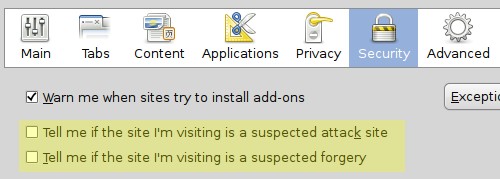
Be advised that this workaround will disable Firefox’s warnings for phishing and malicious websites. Re-enable the warnings when the update to the package xulrunner-1.9 arrives, which should fix the issue.
The problem is caused by Firefox’s urlclassifier database, which can get very large. Because the cache for this database is too small, there’s a lot of disk and CPU usage at certain times when accessing it.
I’ve done the workaround, but it’s hard to say whether it’s working because the problem comes and goes randomly.
[update] The update hasn’t fixed the problem for me. However, I’ve had only one brief random freeze, so maybe the issue has been minimized.
Archived Comments
Anonymous
Another solution to this problem is to install and use Epiphany. :)
VS
Great! Thanks a million. This has been really bugging me…
VS.
Anonymous
I’ve noticed slowdowns like this as well… Good to know there’s a workaround for it. Thanks!
Anonymous
Re-enable the warnings when the update to the package xulrunner-1.9 arrives, which should fix the issue.
Perhaps you could remind us at the time ;-)
Cheers for the workaround!
beq
this random freeze is so irritating! I LOVE my ubuntu, and switching to winxp for a while ,really sucked !
Thanks x 10000000000 ! for the tip.
beq
well, it happened again. Im not sure if it is a nvidia driver (happens with the 162 and the 173beta), or anything else. I think im going to use Opera or go back go firefox 2 for a while.
Prakash
Hey!thanks for the solution!It worked :-D
Markyboy
I get random freezes all the time in Gutsy 7.10 AMD64. Seems especially frequent when using Evolution. Looking at Sys Monitor, it appears that my system skips between maxing out one core and then the other. Super frustrating.
Disappointed to hear that these problems may not be resolved when I upgrade…
MADrod
i Agree with you beq,
I’m seriously thinking about going back to firefox 2.x
See ya
Mohan
Awesome, thanks. I get this on my laptop but not on my desktop, weird I know.
MKdx
Another option: Try/use Firefox 3 beta4 until FF3 Final arrives or the problem get fixed.
It’s available as executable on Mozilla site, just download the compressed file and extract it then double click the firefox-bin and you are browsing.
Ah if you need the bookmarks from ff3b5, just export them then you can use them with ff3b4.
Vertimyst
Thanks for this, I’ve been really getting annoyed at the random freezes/slowdowns.
an0n1 m0us
Another cause of such nightmares can be the buggy Linux version of Adobe’s Flash Player.
Check to see if you are visiting any sites with a lot of Flash objects or only one or two that may be quite intensive.
An example is some bullshit bottom right of screen popin video ad on Gizmodo. I block ads but a friend said he was having a nightmare with Firefox on Hardy and I diagnosed Flash as the problem.
To reduce this problem, I recommend Ad Block as it will block Ads in Flash leaving hopefully enough resources for the youtube players and such on sites to work as normal, whether embedded inside Flash players or not.
rebug
Mozilla/5.0 (X11; U; Linux i686; en-US; rv:1.9pre) Gecko/2008051117 Minefield/3.0pre ID:2008051117
Firefox/adobe flashplayer. Use a symbolic link to run flash in firefox. This
realy downs the firefox hungry for memory/high cpu.
Iakop
jit
Hey thanks for the tip, it really was a life saver for me :p
isurge
This did not have an affect but I disabled the disk cache … and that seems to be make it much better …
sunflower
I’ve almost uninstalled FF3 RC1 because of this issue, and swore I would if present in the final release. Mine freezes on a very regular basis, about every 30 minutes. I often play online games in a second window while reading the news. It’s no fun for your browser to freeze in the middle of an epic battle =].
Anonymous
RC2 is out…. does anybody know if the bug is fixed ?
Anonymous
The problem seems to still exist in RC2 :(
Anonymous
The Problem still exist in Final on WinXP SP3
Anonymous
I’m using Windows and this problem is also present in Firefox 3.0 Final.
Vlado9A3CY
I had the same problem, but I switched off compiz and everithing works okay now with no freezing at all. My Firefox is v 3.0.1 and Ubuntu 8.04.1… (pentium M, 1GB, ati mobility radeon 9600 256MB (laptop).).
ramrode
thanks man !!!!!!!
Anonymous
This is ridiculous ! This bug hasn’t been fixed even in FF 3.0.4.. :(
Opera is my new friend now
Anonymous
I had this problem as well. I turned of the disk caching (set to 0MB) and it’s working fine. I have high=speed enough that I don’t need files cached.
rabbai
I did wat u suggested but it didnt actually help so I simply went to synaptic package manager, uninstalled firefox and installed it again and boom it started working without freezing…hope it helps
hotnoob
you could also try downgrading to a version that you know works.
here are some instructions on how to do that.
http://hotnoob.isgreat.org/?p=103
Rebroad
This is still a problem with Firefox on Ubuntu 9.10 (64bit) running gnome.
I’m currently running Firefox on OpenSuse 11.2 (64bit) running KDE, and have had no freezes so far.
I suspect it might be gnome or ubuntu specific. It’s a shame that it’s been a problem for the last three major releases of ubuntu though.
Scott Wegner
I’ve also heard this could be due to an excessive searching going on in Firefox 3’s new location bar. When you start typing, Firefox searches through bookmarks and history for matching pages. If your history grows too large, it can start bogging down Firefox and cause excessive I/O.
If the workaround you’ve posted isn’t cutting it, try clearing your history (or use a clean profile) to see if that helps.